Give your pool crew a workflow built around the water
Keep readings, treatment, checklists and customer reports together in PoolBoss. Every feature is included from Free, so the tools your crew needs do not depend on buying a larger feature bundle.
Explain the water treatment and prepare the next tech
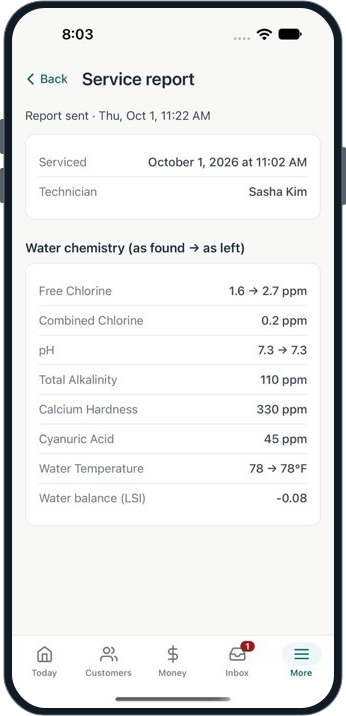
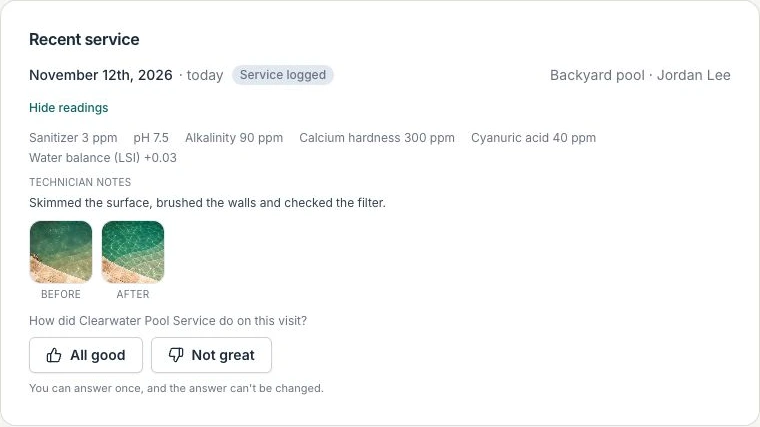
Give the next tech a useful starting point and the office a clear record when a customer asks about the water. PoolBoss keeps before-and-after readings with the visit, so the team can see what was found and what was left.
Record at the poolEnter readings before and after treatment.
Review in the officeOpen the history to explain the recorded care.
Prepare the next visitGive the next tech the pool’s water history.
Every feature included · Free for 20 pools and 1 admin
Keep more of the subscription budget
Jobber Connect for five users is $199/month with no commitment. PoolBoss Startup is $29/month standard for 100 pools with unlimited users. That is $170 a month your company can put toward supplies, payroll or growth before separate payment fees.
Get automated collection and accounting from the start
Jobber puts automatic collection, quote and invoice follow-ups and QuickBooks Online on Connect. PoolBoss includes its autopay, configured quote reminders and QuickBooks sync on every plan, helping a small company reduce billing work without buying a higher feature tier.
A pool operator described finding Jobber’s photo and chemical-reading workflow awkward. Jobber does support readings through checklists. PoolBoss gives your crew dedicated readings, LSI, dose guidance and pool history, connecting treatment to reports and chemical-cost review.
PoolBoss includes unlimited technicians and office managers on every plan and unlimited admins on paid plans. Everyone can use their own role and assigned records while the subscription stays within its pool-capacity tier.
Connect is $199/month for 5 users on monthly billing with no commitment.
Check the billing term, included users and add-ons against your requirements. This is a subscription comparison. Payment fees and optional services may change the total.
Source reviewed November 11th, 2026. Published terms can change.
Run a route, send a report and review an invoice
Start with up to 20 familiar pools on Free. Import a few customer and pool records, complete a visit, then review its service report and the account’s invoice. Add the rest of your customer list when you’re ready.
Free for up to 20 pools and 1 admin. Every feature included.
Test with a pool your crew knows
Include access notes, a service checklist and the historical details your crew needs. Check imported records before using them on the route.
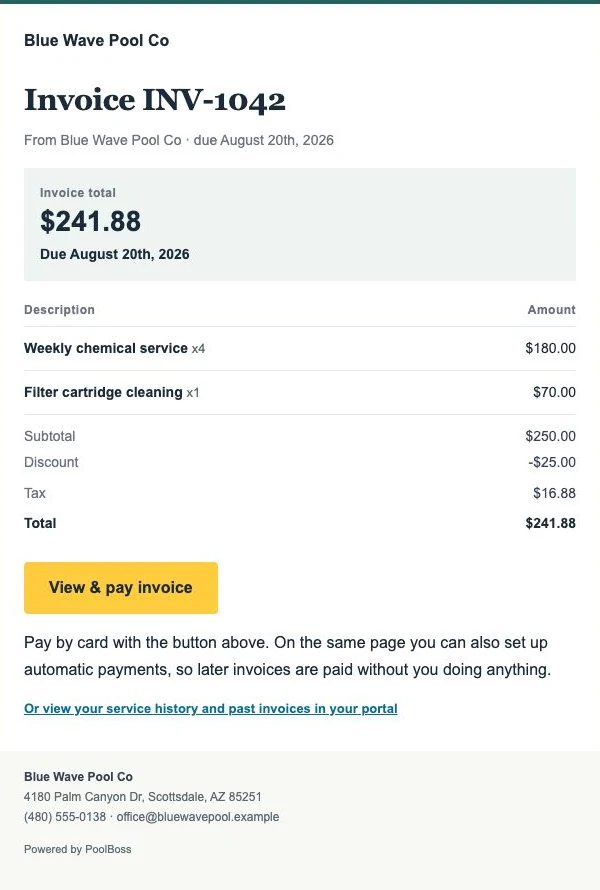
Review the service report and invoice
Have a tech record service, then open the same history from the office. Review the customer report and the invoice for that account.
Choose capacity for your pools and admins
Use the pricing calculator to choose the plan for your pool count and admin needs. Every plan includes unlimited techs and office managers, with customer-payment fees shown separately.
The deciding factor: chemical tracking
PoolBoss connects structured chemical readings, LSI, dose guidance and the pool’s history in the visit workflow. Your tech can test and treat the water, and your office can review the same record when a customer asks about the care. Jobber supports chemical records through checklists and a separate chemical-tracking tool; compare how the complete pool visit works for your crew.
Jobber is a polished product with a strong payments flywheel, a well-liked client hub, and broad field-service features. If you don’t need pool chemistry and want a mature generalist, Jobber is solid.
Pricing: compare like for like
It’s easy to undercount Jobber. Its $49 Core plan doesn’t include route optimization or QuickBooks sync - both gate at the Connect tier, which is $199/mo (5 users). So the honest comparison is Connect, not Core, because that’s the Jobber plan that does what PoolBoss does on every plan. PoolBoss charges a flat rate by pool count with every feature included and unlimited users on paid plans, so adding a tech doesn’t change your bill.
What the cheaper Jobber plan leaves out
You have to pay more to unlock these
You do get them on Jobber — on Connect, at $199/mo for five users
Route optimizationConnect
QuickBooks syncConnect
Automated quote follow-upsConnect
Job costingConnect
Included on every PoolBoss plan
Including Free — up to 20 pools, no card
Route optimization
Quotes & estimates
Job management
Schedule
Dosing calculator
Customer emails
Chemical tracking
Offline mobile app
Customer portal
QuickBooks sync
What you’d pay as you grow
PoolBoss is flat by pool count and never charges per tech or per seat, so the bill flattens out. Here is the same growth on each tool, from a starter route to a large fleet.
Monthly cost as you grow: Jobber vs PoolBoss, by users, estimated from published prices as of November 12th, 2026.
Users
PoolBoss
Jobber
1 user
$29/mo
$199/mo
5 users
$79/mo
$199/mo
10 users
$249/mo
Custom sales call
25 users
$249/mo
Custom sales call
50 users
$249/mo
Custom sales call
PoolBoss caps at $249/mo and never charges per user. Jobber is per seat from the Connect tier up (the first with route optimization and QuickBooks): $199/mo for 5 users, with Plus at $499 for 5. Core ($49) leaves both out. Custom means the provider must quote the subscription; no numeric savings are calculated. PoolBoss bills by pool count, not headcount, so its column assumes a typical route of about 50 pools per user. Past 5 users Jobber adds per-user fees we haven’t verified, so those sizes show no figure. Estimates use published list prices as of November 12th, 2026; your actual bill may differ.
See how PoolBoss connects the work
These are actual PoolBoss screens showing how route details, water readings, invoices and customer records fit together. Every feature shown is included on Free, which covers up to 20 pools and one admin.
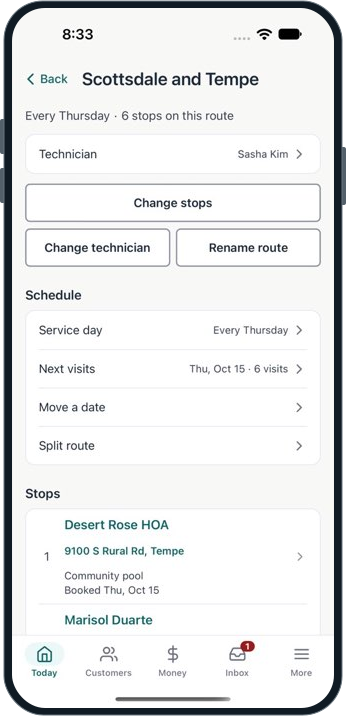
Send the route with the details your tech needs
PoolBoss keeps the assigned technician, recurring service day and ordered stops together. Your crew can see where to go without rebuilding the route every week.
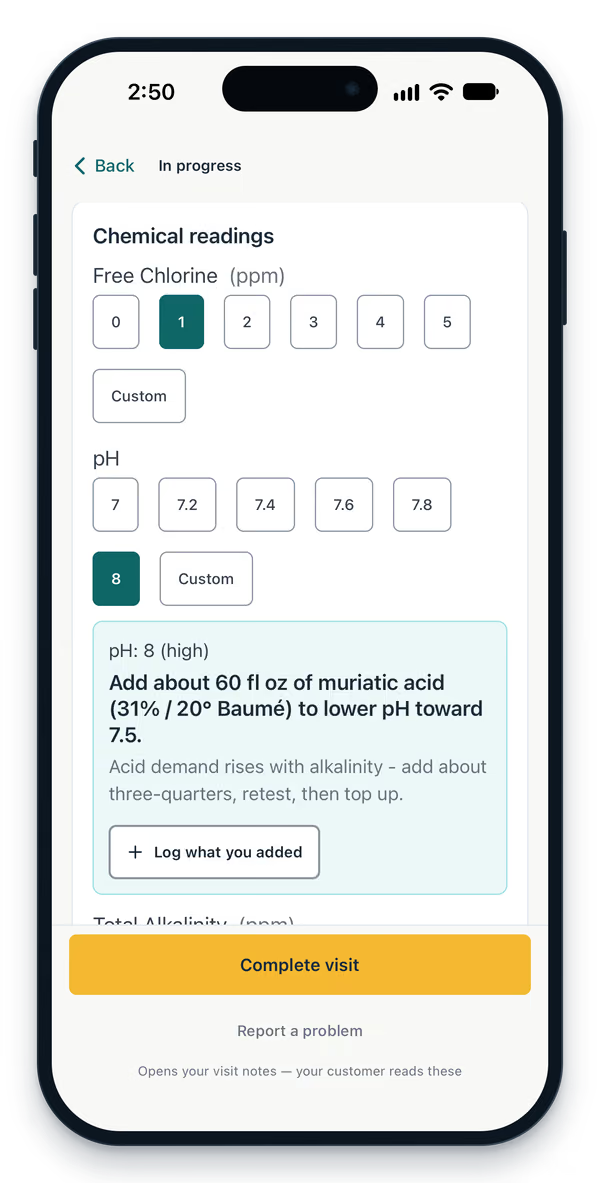
PoolBoss keeps readings with the visit and suggests a dose for the pool. Your office can use that service history when a customer calls or another technician covers the stop.
PoolBoss brings completed visits, water readings and feedback into your company’s customer portal. Customers can check the record without waiting for your office to answer a routine service question.
The customer’s service history, readings, photos and feedback
Import your customer list and set up your routes
You don’t have to pick a cutover day, and you don’t have to cancel anything to try it. Run both for a couple of weeks if you want — the free plan covers up to 20 pools and one admin with every feature and no time limit.
Export your customers and pools
Export your client list out of Jobber. Save it as CSV. You don’t have to clean it up, rename a single column, or match it to a template of ours.
Step one of four
Upload it and check the preview
We match your columns to ours automatically and show you exactly what we found - row by row, including anything we couldn’t read and any column we’re about to ignore. Nothing is written until you confirm.
Customers, then pools
Bring the history over too
Past visits and their chemical readings import the same way, so a customer who’s been on your route for three years still looks like it. Then build your routes and you’re running.
Same afternoon
What actually comes over?
Customers, pools and their specs, routes with stop order, and past visits with their chemical readings - chlorine, pH, alkalinity, hardness, CYA, salt and temperature.
Do I have to cancel Jobber first?
No. Nothing here asks for a card, so you can run both until you’re satisfied and cancel on your own schedule.
What if the file is a mess?
Most of them are. The preview flags the rows it can’t read and the columns it isn’t using, so you fix them before anything is created - not after.
What if I import the same file twice?
Customers, pools and visit history are matched and skipped rather than duplicated, using your old system’s record IDs when the export includes them.
Will my customers get emailed?
No. Importing three years of history doesn’t send three years of service reports. Historical visits import silently.
What does it cost?
Nothing. The importer is part of the product on every plan, including free.
Compare costs for your company
Price
Jobber charges per seat, so the bill tracks your headcount rather than your work. The first plan with route optimization and QuickBooks is Connect at $199/mo for five users, and Plus is $499. Ours is flat by pool count and doesn’t count people at all.
Features
Jobber supports chemical records through checklists. PoolBoss connects numeric water readings, LSI, dose guidance and pool history to the service report, giving your crew and office the context behind each treatment on every plan.
Switching
Bring your customers, pools, routes and visit history across from a spreadsheet. Stay on the free plan up to 20 pools while you decide. No card, no clock, nothing to cancel if you walk away.
How PoolBoss compares to the rest of the field
Every head-to-head uses the same yardstick: what it costs at your pool count, what sits behind a higher tier, and what moving over actually takes.
Does Jobber have chemical tracking for pool service?
Yes. Jobber supports chemical records through checklists and a chemical-tracking tool. PoolBoss brings numeric water readings, LSI, dose guidance and each pool’s history into the visit itself, then uses that record for customer reports and chemical-cost review. The advantage is how the pool-care workflow fits together, with every PoolBoss feature included on every plan.
Is PoolBoss or Jobber better for a pool company?
PoolBoss is built around recurring pool care: the route, pool details, readings, treatment and customer report stay connected. Your office can use the same record for billing and follow-up. Jobber serves many trades; PoolBoss gives a pool company that complete workflow without choosing a higher feature tier.
Is Jobber more expensive than PoolBoss?
Usually, once you compare the same feature set. Jobber’s $49 Core plan leaves out route optimization and QuickBooks; the first plan with both is Connect at $199/mo for five users, and Plus is $499. PoolBoss includes every feature on every plan and is flat by pool count with unlimited users on paid plans, from free to $249, so it’s usually cheaper for a crew.
Does Jobber work for pool service at all?
Yes. Jobber offers recurring jobs, checklists, invoicing and payments. PoolBoss adds a pool-specific workflow with numeric readings, LSI, dose guidance and separate histories for each body of water. Your next technician and office can understand the pool’s care without piecing together separate records.
Does PoolBoss sync with QuickBooks like Jobber?
Yes, on every plan including the free one. PoolBoss syncs invoices and payments to QuickBooks Online, the workflow your accountant expects. Jobber includes QuickBooks too, but only from its Connect tier ($199/mo for five users) up - the cheaper Core plan doesn’t have it.
Start a free account and try your service workflow
Start with up to 20 pools free. Every plan includes every feature, with unlimited techs and office managers.