Generate visits from the recurring schedule
Choose weekly, every-other-week, monthly or custom route frequency. Individual customers can have a different interval within the route.

PoolBoss keeps readings, equipment and history specific to each pool, so your California crew has the right context when salt and chlorine pools share the same route.
Free for up to 20 pools. Every feature included.
PoolBoss uses each pool’s sanitizer setting to show the relevant reading fields, so a mixed route includes salt readings for salt pools without adding them to chlorine-only visits.
PoolBoss keeps salt readings and salt-cell details with the pool, including model, serial and warranty information. Your crew can check the right equipment and history before planning follow-up work.
Record the standard chemistry without a salt field that does not apply. Keep treatment, notes and visits in that pool’s own history.
Keep each pool’s volume, sanitizer type and equipment details in its own record.
The tech uses the pool’s service record, including salt readings for salt pools, and records the work completed.
Your crew can refer to that pool’s earlier readings, while the customer sees the visit through the service report.
Every feature on every plan. Free includes up to 20 pools and 1 admin.
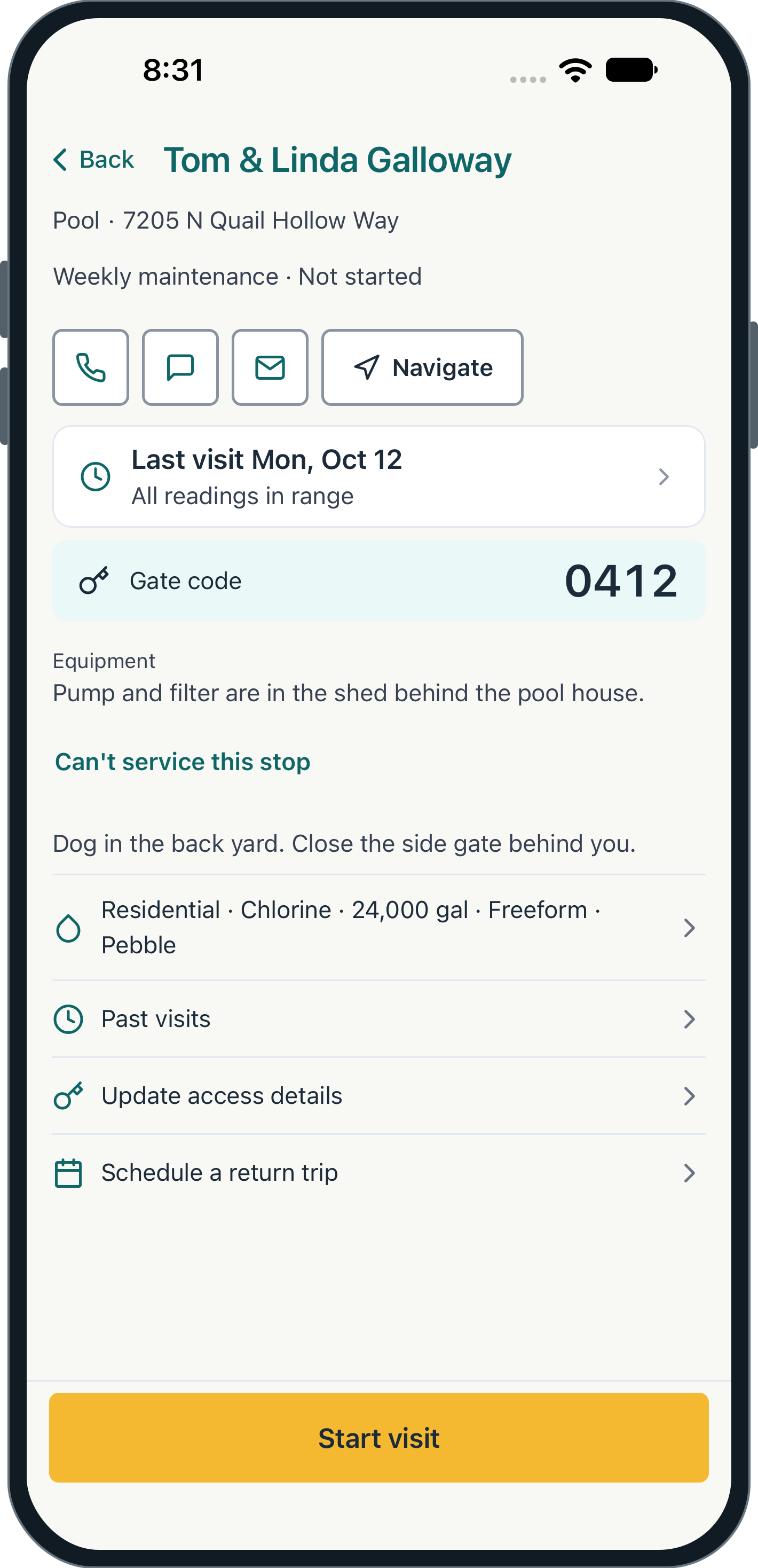
PoolBoss brings the pool’s sanitizer, volume and equipment details into the visit workflow, so the tech can record relevant readings, service tasks and equipment checks together.
Keep each pool’s water history separate, including a pool and spa at the same address. That helps the office follow a concern without mixing readings from different bodies of water.
Salt-cell care, basket checks and filter pressure can sit alongside the chemistry record. Equipment details help when a repair or replacement needs discussion. Explore chemical tracking See equipment records
Choose weekly, every-other-week, monthly or custom route frequency. Individual customers can have a different interval within the route.
Add a stop where it belongs geographically and review arrival windows. Optimization gives the office a proposed order to confirm before changing the day.
Assign routes to named techs and give each their own daily work. Temporary coverage can move one day’s visits without changing the regular pattern.
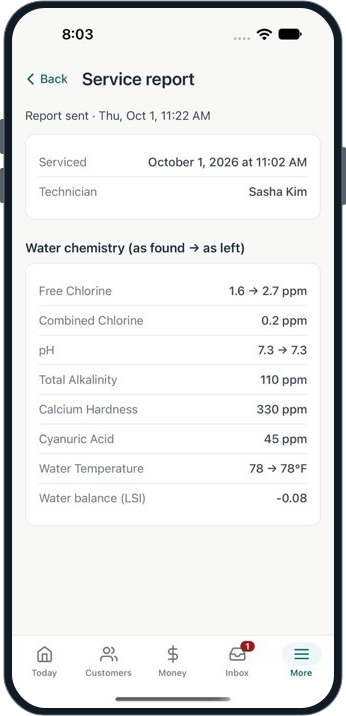
See route planning Explore schedulingPoolBoss builds dated service reports from logged readings, photos and completed work, with your company’s name and logo so customers recognize the service behind the record.
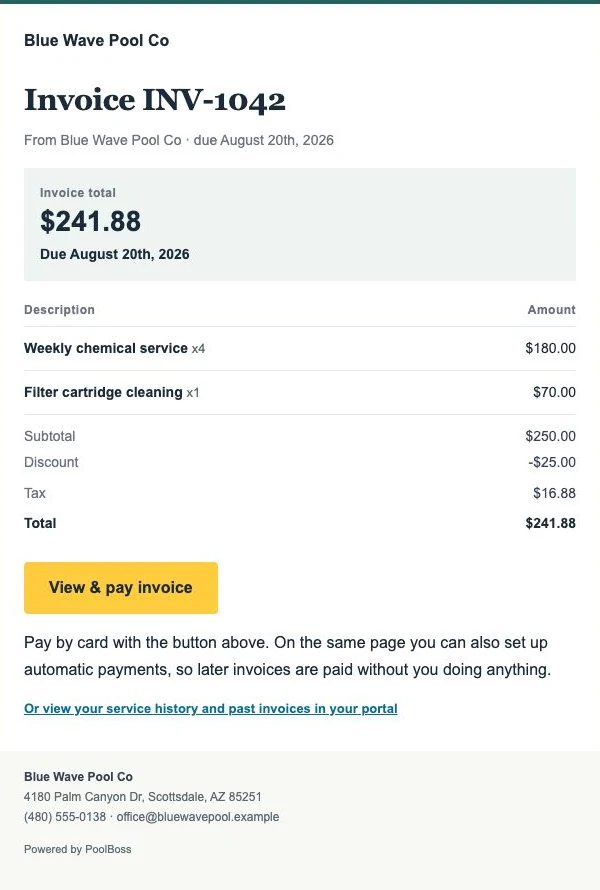
Billing uses the same account history. Review the charges, keep additional work clear and send an invoice with a payment link. The customer can also revisit invoices and recent visits in their portal.
Techs record the work on current phones, with offline saving and later sync when the connection returns. See the mobile app
PoolBoss is pool service software for pool companies in California. It’s built for a year-round route across salt and chlorine pools: log readings at each pool on your phone, track salt alongside the standard chemistry, and bill from the visits you logged. The Free plan covers up to 20 pools at no cost.
California has one of the highest per-capita pool ownership rates in the country. The Los Angeles, San Diego, Bay Area, and Inland Empire markets each support dense pool service industries. Service is year-round in most of the state, and the pool mix is increasingly split between traditional chlorine pools and saltwater systems - sometimes on the same block.
For California pool companies, the work is consistent, competitive, and chemistry-intensive. Routes are often compact in the suburbs, but the mix of pool types on a single route means you need to track different parameters for different pools without mixing them up.
A California pool route commonly mixes saltwater pools and traditional chlorine pools. The chemistry on each is different: salt pools need a salt level reading alongside the standard panel, while chlorine pools use the standard set only.
In PoolBoss, each pool’s sanitizer type is set in its profile. When a technician logs a visit at a salt pool, the salt level field appears in the logging form. At a chlorine pool, the form shows the standard parameters. One route, one app, the right fields for each pool. The chemical history per pool stays accurate regardless of how many pool types are on the route.
Most California routes run all year. Southern California rarely sees pool closures, and even the Bay Area and Central Valley run at some level through the winter. The chemistry demands shift - summer UV and heat accelerate chlorine loss, winter tends toward pH drift - but the service cadence continues.
PoolBoss routes are recurring and set to whatever cadence the customer requires - weekly, biweekly, or custom. The route shows up in the tech’s mobile app on the service day without manual setup each week.
California residential routes are often geographically compact - many stops close together in suburban neighborhoods. PoolBoss keeps your stops in the order you set them. You organize the route geographically once and it runs that way.
When you add a new account in a neighborhood you already serve, you insert it into the route in the right position. When you hire a tech to cover part of the route, you split it and assign each half to the appropriate technician. Each tech sees only their own stops.
The PoolBoss mobile app keeps California techs organized through a full day of stops: today’s route with ordered stops and addresses, each pool’s sanitizer type and specs visible before starting, the right logging form for each pool type, and a mark-complete that records the visit.
The admin sees completed visits from the web dashboard in real time. If a tech leaves a note about a cloudy pool or a broken skimmer basket, it’s visible without a call. Service reports go to customers after the visit.
PoolBoss connects your service records to billing so you can create invoices from the logged visits and send them with an online payment link. Customers can pay by card from the invoice email, giving them a way to pay without arranging a check pickup.
California pool service companies often compete on professionalism as much as price. Clean invoices with online payment options, consistent service reports, and accurate chemical records help customers see the work your company has done and understand the bill.
The PoolBoss Free plan covers up to 20 pools at no cost, no trial clock, and every feature included: routes, chemical tracking (including salt pools), invoicing, and the mobile app. When you pass 20, you move to Startup at $29 a month. Pricing uses fixed pool-capacity tiers and is the same for a Los Angeles company as it is for one in San Diego or Fresno.
Free
Up to 20 pools at no cost. Move up by pool count as your California route grows.
Every plan includes every feature. Choose your pool capacity; Free has one admin and paid plans include unlimited admins.
See all plans and pricing21 workflows across PoolBoss and 12 alternatives. A request to confirm a feature is not a claim that it is absent.
Scroll across to compare providers. Column headings stay visible as you read.
| Workflow | PoolBoss | Skimmer | Pool Brain | Jobber | Housecall Pro | GorillaDesk | Pool Founder | PoolDial | Paythepoolman | Pool Service Software | Pool Office Manager | POOL360 PoolService | ServiceTitan |
|---|---|---|---|---|---|---|---|---|---|---|---|---|---|
| Recurring routes and schedules | Included · generate repeat visits without rebuilding the week | Route builder | Jobs and route stops | Recurring visits | Scheduling and dispatch | Scheduling | Route builder | Routes and schedules | Recurring routes | Routes and scheduling | Daily and weekly scheduling | Scheduling | Scheduling and dispatch |
| Route optimization | Included · preview stop order and arrival-window conflicts | Scaling Up | One-click optimization | Listed; confirm selected plan | Max plan | Pro plan | Route building and Best Fit | Route optimization | Optimization; confirm stop limits | Routing tools; confirm optimization | Route optimization | Route optimization | Confirm in your chosen plan |
| Water readings and pool history | Included · review the test history for the correct pool | Chemical tracking | Per-body-of-water records | Readings through mobile checklists | Chemical data and service history | Material-use tracking; confirm water-reading fields | Pool chemistry and history | Chemical tracking | Pool measurements and readings | Readings and chemistry history | Chemical tracking | Water analysis | Confirm in your chosen plan |
| LSI and dose guidance | Included · calculate from the visit readings and pool volume | Scaling Up | Dose calculations; configurable methods | Confirm LSI and dose calculation | Confirm LSI and dose calculation | Confirm LSI and dose calculation | LSI and dose guidance | Dose recommendations; confirm LSI | Orenda integration in Plus | LSI and dosage tools | Adjustment calculations; confirm LSI | Chemical prescriptions; confirm LSI | Confirm in your chosen plan |
| Service checklists and photo requirements | Included · give the crew a consistent service standard | Required checklist items on Scaling Up | Guided workflows | Job checklists on Connect | Checklist automations on Essentials | Notes and forms; confirm required-photo controls | Service tasks and photos; confirm completion rules | Custom inspections and photo proof | Checklists and photos; confirm completion rules | Photo proof; confirm completion rules | Custom reports and photos; confirm completion rules | Completion photos; confirm required controls | Forms and checklists; confirm requirements |
| Customer service reports | Included · show customers the care behind the bill | Reports and emails | Completion emails | Job documentation; confirm pool report format | Photo reports on Essentials | Confirm pool-specific report format | Visit reports | Service logs; confirm report detail | Emailed service records | Visit reports | Digital post-service reports | Emailed service reports | Confirm pool-specific report format |
| Offline field recording | Included · record visits, readings and photos through signal gaps | Offline field app; check sync requirements | Offline field app | Confirm offline recording scope | Offline viewing; confirm recording | Confirm offline recording scope | Offline technician app | Offline mobile mode | Confirm offline recording scope | Confirm offline recording scope | Confirm offline recording scope | Confirm offline recording scope | Confirm offline recording scope |
| Equipment and warranty records | Included · identify equipment before quoting or sending a tech back | Confirm in your chosen plan | Equipment by body of water | Confirm in your chosen plan | Confirm in your chosen plan | Device tracking; confirm warranty fields | Confirm warranty fields | Equipment records; confirm warranty fields | Confirm in your chosen plan | Confirm in your chosen plan | Equipment and inventory; confirm warranty fields | Confirm in your chosen plan | Confirm in your chosen plan |
| Periodic maintenance and due work | Included · plan work that is not due at every visit | Work orders and reminders | Filter and salt-cell clean scheduling | Recurring jobs; confirm due-work view | Recurring service plans on Max | Confirm due-work view | Recurring work; confirm due-work view | Work orders; confirm due-work view | Confirm in your chosen plan | Confirm in your chosen plan | Seasonal and repair scheduling | Confirm in your chosen plan | Confirm in your chosen plan |
| Quotes and repair jobs | Included · move field findings into proposed, scheduled and billable work | Quotes and jobs on Scaling Up | Quotes and jobs | Quotes and one-off jobs | Estimates; proposals vary by plan | Estimates | Quotes and work orders | Quotes and work orders | Bids and proposals | Confirm in your chosen plan | Quotes and repairs | Repair quotes | Estimates and pricebook |
| Chemical and parts inventory | Included · track shop/truck supplies and prepare repair parts | Shopping list; confirm stock controls | Chemical use and cost; confirm stock controls | Confirm stock and location controls | Confirm stock and location controls | Material tracking; confirm stock controls | Confirm in your chosen plan | Confirm in your chosen plan | Confirm in your chosen plan | Confirm in your chosen plan | Inventory control | Inventory and supplier ordering | Confirm package and stock controls |
| Owner and office work on mobile | Included · schedule visits and create quotes and invoices by role | Mobile tools; confirm required admin actions | Field and web quotes; confirm admin scope | Mobile app; confirm role scope | Mobile app; confirm role scope | Mobile app; confirm role scope | Mobile team app; confirm role scope | Mobile business tools | Mobile tools; confirm role scope | Mobile app; confirm role scope | Technician tools; confirm office scope | Mobile service app; confirm office scope | Field app; confirm office scope |
| Recurring invoices | Included · bill from completed visits or a fixed monthly rate | Invoicing | Automatic/manual, per-visit/flat-rate | Recurring jobs and invoices | Invoicing; recurring plans vary by tier | Subscription billing on Pro | Invoices from completed work | Invoicing | Batch billing | Invoicing | Automated repeating invoices | Automated billing | Invoicing; confirm recurring setup |
| Customer-authorized autopay | Included · collect eligible new invoices within a day of sending | Autopay | Payments; confirm automatic-collection setup | Automated collection on Connect | Payments; confirm automatic-collection setup | Subscription billing on Pro | Autopay | Autopay | Autopay | Confirm autopay workflow | Confirm automatic-collection setup | Confirm automatic-collection setup | Confirm package and collection setup |
| Card and bank payment choices | Card checkout and eligible US-bank autopay · payment fees separate | Confirm supported methods and fees | Confirm processor methods and fees | Online payments; confirm methods and fees | Online payments; confirm methods and fees | Payment integrations; confirm methods and fees | Card and ACH | Confirm methods and fees | Card payments; confirm ACH and fees | Payments; confirm methods and fees | Stripe integration; confirm methods and fees | Online payments; confirm methods and fees | Confirm processor methods and fees |
| Customer portal | Included · customers can find reports, invoices and payment options | Customer portal | Portal and service history | Client Hub | Confirm selected customer-portal scope | Pro plan | Customer web portal | Customer portal | Optional Pool Junction customer app | Separate module; first 10 active clients free | Confirm customer-portal scope | Confirm customer-portal scope | Confirm customer-portal scope |
| QuickBooks Online | Included · send supported invoices and payments without re-entry | Listed integration | QuickBooks sync; confirm edition | Connect plan | Essentials plan | Pro plan | QuickBooks sync | Listed; confirm edition | Confirm supported integration | Listed; confirm setup and module terms | $25/month add-on | QuickBooks integration; confirm edition | Confirm edition and package |
| API and webhooks | Included · connect supported records to your own tools | Custom integrations on Enterprise; confirm API scope | Confirm API access and price | App marketplace; confirm API scope | Open API on Max | Zapier on Pro; confirm API scope | Confirm in your chosen plan | Developer API | Confirm in your chosen plan | API module: $99/month + $295 activation | Confirm in your chosen plan | Confirm in your chosen plan | Confirm package and API scope |
| Ongoing free plan | 20 pools and 1 admin · every feature, no trial deadline | Paid plans after trial | Paid plans after trial | Paid plans after trial | Paid plans after trial | Paid plans after trial | Paid plans after trial | Paid plans after trial | Paid plans after trial | 10 properties; modules have separate terms | Paid plans after trial | Request current terms | Request current terms |
| What makes the subscription grow | Pool capacity · no technician, route or office-manager seat fees | Serviced locations and plan | Active field technicians | Plan and user allowance | Plan and user allowance | Plan and route count | Technician count and enrollment rate | Serviced pools | Base plus technician count | Property plan and optional modules | Active users and optional modules | Request current quote | Quoted package and technician count |
| All features in the entry plan | Yes · adopt more PoolBoss tools without a feature upgrade | No; Scaling Up and Enterprise add tools | All features advertised; confirm services | No; feature tiers | No; feature tiers | No; feature tiers | All features advertised; optional phone answering | Platform included; confirm services | Optional products and packages | Portal and API modules separate | Core features; optional modules | Confirm current package | Packages differ |
PoolBoss connects each pool’s readings, treatment and history to the visit report, helping your crew plan the care and your office explain it.
You pay by how many pools you manage. No per-seat fees, no per-pool meter, and no surprise line on the bill as you grow.
PoolBoss includes every feature on every plan. Choose the pool capacity you need. Free allows one admin; paid plans include unlimited admins.
PoolBoss runs on supported iPhone and Android devices. Sign in and load the route before a signal gap, then record the visit offline and sync when connected.
“Easy to pick up, easy to stick with.”
Free covers up to 20 pools and 1 admin, with every feature included and no trial clock. Every plan includes unlimited techs and office managers. Paid plans add capacity, unlimited admins and a 30-day trial.
Free for up to 20 pools. Every feature included.
Answers for the way you run your route.
Yes. PoolBoss works for pool companies throughout California and across the United States. It connects recurring routes, pool details, chemistry, customer reports and billing, so your crew and office use the same service record. Set the service schedule for your accounts; you do not need a state-specific version of PoolBoss.
Yes. Set the pool’s sanitizer type to salt in PoolBoss and the visit shows the salt reading alongside the standard water test. Keep salt-cell details with the equipment record and compare readings over time. Your technician gets the context for that specific pool, even on a route with both salt and chlorine systems.
A flat rate by pool count, the same everywhere: Free up to 20 pools, $29 a month up to 100, $79 up to 250, and $249 for more than 250, with every feature on every plan.
PoolBoss is built for California pool companies that want recurring routes, water records, service reports and billing in one system. Techs record the visit on their phones, while the office uses the same history for customer questions, repairs and invoices. It supports mixed salt and chlorine routes and multiple pools under commercial accounts.
Set the sanitizer type for each pool in PoolBoss. The technician sees the relevant fields at each stop, and every pool keeps its own readings and history. Your crew can work a mixed route without maintaining separate forms for salt and chlorine accounts.
PoolBoss tracks both on the same route. Each pool’s sanitizer type controls the relevant reading fields, and the test results remain with that pool’s history. The technician can move from a salt pool to a chlorine pool with the right details ready at each stop.
Yes. PoolBoss works in Los Angeles, San Diego and throughout California. Group accounts into recurring routes, preview the driving order and give each tech their stops, access notes and service requirements. Your office can follow completed work and billing from the same records without a city-specific plan.
Start with up to 20 pools free. Every plan includes every feature, with unlimited techs and office managers.
Start freeFree includes 1 admin. Paid plans start with a 30-day trial.