
Run a sharper pool company with PoolBoss
PoolBoss includes every feature on every plan, with published pool-capacity pricing and unlimited techs. See the difference against the software you use today, then start with your own route on Free.
Every feature included · up to 20 pools and 1 admin free
Choose a guide to help compare pool software
Find the pricing and workflow differences that matter to your company. Every guide shows how PoolBoss connects the route, service record and bill.
See why pool companies should choose PoolBoss
PoolBoss vs Skimmer
Get LSI, dosing and route tools on every plan
PoolBoss vs Jobber
Keep water readings and treatment with every pool
PoolBoss vs Housecall Pro
Get pool-care tools without feature add-ons
PoolBoss vs ServiceTitan
Start with published prices and self-service signup
PoolBoss vs Pool Brain
Give every tech a required service checklist
PoolBoss vs GorillaDesk
Include the portal and QuickBooks sync in your plan
PoolBoss vs Pool Founder
Add techs without a per-technician subscription
PoolBoss vs PoolDial
Add pools within your tier at the same price
PoolBoss vs Pay The Pool Man
Include every technician in one capacity plan
PoolBoss vs POOL360 PoolService
Run routes and billing on a published monthly plan
PoolBoss vs Pool Service Software (PSS)
Get the customer portal and API included
PoolBoss vs Pool Office Manager
Add office staff without an active-user fee
See how PoolBoss works with your own route
Try PoolBoss freeGive every tech a checklist for consistent service
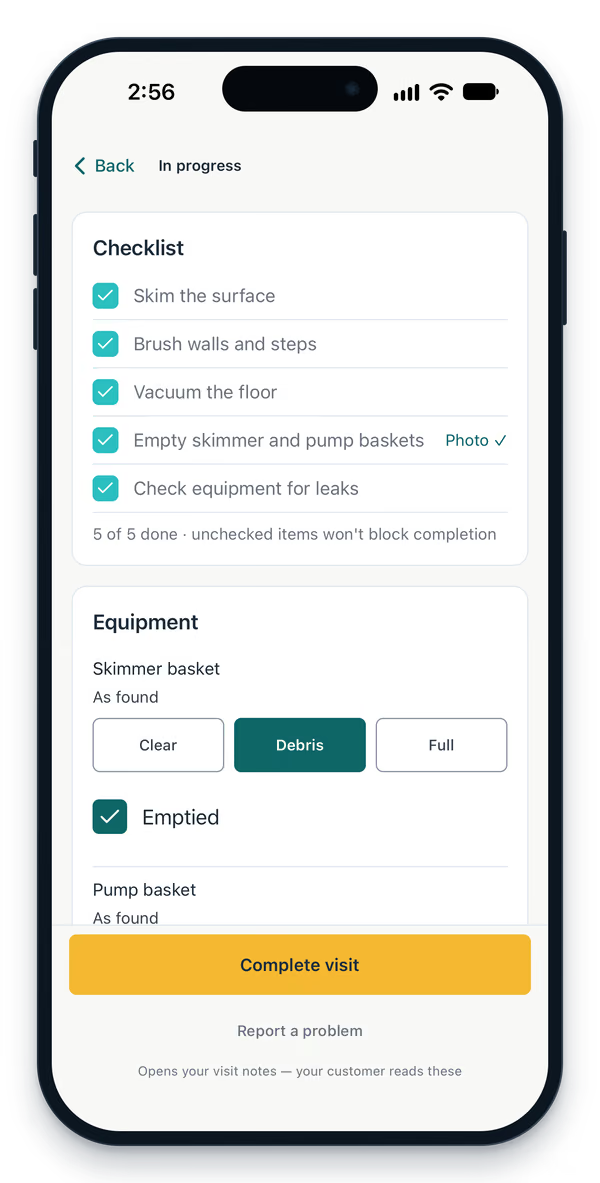
Give a tech a clear service checklist, then keep the completed tasks with the visit. The office can see what was recorded and the customer report can explain the care their pool received.
- Assign the service typeGive the tech the checklist that fits the visit.
- Record the workLog the completed tasks and water readings at the stop.
- Share the service recordLet the office review the visit and the customer see the report.
Free for up to 20 pools and 1 admin. Every feature included.
Compare the tools your pool company will use
Start with the service and office tools you need, then compare how the subscription changes as your route grows. PoolBoss includes every feature on Free, with capacity for up to 20 pools and one admin.
| Software | Pricing model | Free plan | Built for pools | Chemical tracking |
|---|---|---|---|---|
| PoolBoss | Flat by pool count, from $0 | Yes (20 pools) | Yes | Yes |
| Skimmer | Per pool, $98+/mo for full features | No | Yes | Yes |
| Pool Brain | $50 base + $65 per field tech | No | Yes | Yes |
| Pool Founder | Currently $45 per field tech/month | No | Yes | Yes |
| Pool Service Software | By pool count, $0-$99+ | Yes (10) | Yes | Yes |
| Pay The Pool Man | Per tech, $50+$15/tech | No | Yes | Yes |
| POOL360 PoolService | Per pool, price by demo only | No | Yes | Yes |
| Pool Office Manager | Per user, $150+/mo with QuickBooks | No | Yes | Yes |
| Jobber | Feature and user tiers; Connect 5 users $199/mo | No | Multiple trades | Checklists and chemical tool |
| Housecall Pro | Feature and user tiers; Essentials $189/mo | No | Multiple trades | Chemical records advertised |
Choose the comparison you need
PoolBoss combines recurring routes, pool chemistry, customer reports, billing and business reporting on every plan, with published pool-capacity pricing and a free start. Compare the tools below by the full workflow your crew and office need, the number of pools and staff you expect, and which features each subscription includes.
The best Skimmer software alternative for most independent pool companies is PoolBoss. Skimmer charges per serviced location, so the bill climbs as you add pools, and route optimization and quotes sit on their $98/mo Scaling Up tier. PoolBoss charges a flat monthly rate by pool-count tier, starts free up to 20 pools, and puts every feature on every plan.
Common questions
What is the best pool service software?
The best fit is software built specifically for pool routes rather than general field service, because pool work is recurring maintenance with water chemistry at its center. PoolBoss is purpose-built for it: recurring routes, structured chemical readings on every visit, service reports, and invoicing, priced flat by pool count with every feature on every plan and a permanent free tier. PoolBoss connects water readings with dose guidance, pool history and customer reports, so your company can use the record throughout the service workflow. Jobber and Housecall Pro also offer chemical records; compare how those records connect to the rest of your work.
How is PoolBoss different from Skimmer?
The main difference is pricing model. Skimmer charges per pool per month, so the bill scales with the number of pools you service. PoolBoss is a flat monthly rate by pool-count tier with every feature on every plan and unlimited users on paid plans, plus a free tier for up to 20 pools. PoolBoss also connects routes, chemistry, customer reports and billing on every plan, so your company can use the whole workflow without choosing a higher tier for an individual feature.
Is there a free pool service software?
Yes. PoolBoss has a permanent free plan that covers up to 20 pools for a single admin and includes every feature, not a stripped-down version. It’s a free tier rather than a time-limited trial, so a solo operator can run a small route at no cost.
What should I compare when choosing pool service software?
Compare four things: the pricing model (flat by pool count versus per pool or per seat, and whether costs climb as you grow), whether it tracks water chemistry as structured data, whether it’s built around recurring routes rather than one-off jobs, and whether the field app works on the phones your techs already carry. Those are where pool-specific and general tools diverge most.
Start using checklists and service reports on your route
Start with up to 20 pools free. Every plan includes every feature, with unlimited techs and office managers.
Start freeFree includes 1 admin. Paid plans start with a 30-day trial.