Choose the events the receiver needs
Add an HTTPS endpoint and choose visit completed, invoice paid or both. The payload uses the same record shape as the API.

Keep reporting and follow-up connected to the work your crew records. Your developer can use the PoolBoss API and webhooks to move supported records into your other tools or start a workflow when a visit is completed or an invoice is paid.
Free for up to 20 pools. Every feature included.

Visits, readings and invoices
Reporting and automations
Create a company API key and register your HTTPS endpoint for completed visits or paid invoices.
Your tool reads supported API data or receives a signed webhook with the visit or invoice details.
Your integration uses the data for the workflow you build. Delivery logs, retries and redelivery help you inspect the connection.
Every feature on every plan. Free includes up to 20 pools and 1 admin.
The PoolBoss API lets your developer retrieve supported records for another tool. PoolBoss webhooks notify it when a visit is completed or an invoice is paid, so your own integration can start the follow-up workflow you have built.
/api/v1/Company · Customers · Pools
Visits and readings · Invoices and lines
Events: visit completed · invoice paid
Read invoices, line items and visits into your own reporting process. Lists arrive newest first, with cursor pagination of up to 100 records. PoolBoss supplies the records your developer needs so your office does not have to assemble the same export by hand each time.
Look up a customer by email, list their pools or invoices, and create a customer with a read-write key. Keep an external reference ID with the new record. Your developer can connect customer intake to PoolBoss and reduce repeated typing between systems.
Send an event to an HTTPS endpoint when a visit completes or an invoice is paid. Each message includes the visit with readings or the invoice with its lines. PoolBoss can trigger your integration from the recorded work, so follow-up does not depend on an employee checking for changes.
Filter visits and invoices by status. Each key is limited to 120 requests per minute and reads only the company it belongs to. For accounting in QuickBooks Online, use the built-in integration rather than building your own. See QuickBooks Online
PoolBoss lets admins create a separate API key for each connected tool in Settings under Integrations, so you can choose and later revoke the access that tool needs.
Use a read-only key for a reporting tool or scheduled export that only needs to retrieve company records. The key list shows when it was last used.
Use a read-write key when the connected process needs to create customers. The key belongs to the company, so an office staffing change does not transfer its ownership.
The full key is shown once. Copy it into the intended tool, and revoke it when the connection is no longer needed. A revoked key stops working on its next request.
Add an HTTPS endpoint and choose visit completed, invoice paid or both. The payload uses the same record shape as the API.
The PoolBoss-Signature header contains a timestamp and an HMAC-SHA256 signature made from the timestamp and body with your endpoint secret. The message also has an event ID. Your receiver can verify the signature and guard against replay.
PoolBoss retries failed deliveries on a schedule over about 24 hours, with nine attempts beginning a minute later. The endpoint delivery log records the receiver’s response and includes a Redeliver action.
Included on every plan. Set up the way your company works.
PoolBoss has a REST API and webhooks on every plan, Free included. An admin creates a company API key in Settings, and your other tools read customers, pools, visits with their chemical readings, and invoices, or add new customers. Webhooks send a signed message to your own HTTPS address the moment a visit is completed or an invoice is paid.
The API is for the tools you already run next to PoolBoss. Pull invoices and visits into a spreadsheet or a BI dashboard and slice the numbers your way. Point a no-code automation tool at a webhook, so a paid invoice or a finished visit kicks off the next step on its own. Or have whoever does your tech work write a short script: a CRM that picks up new customers, or a nightly job that copies the day’s visits somewhere else.
For QuickBooks Online you don’t need the API at all. PoolBoss sends invoices and payments to QuickBooks by itself.
An admin creates API keys in Settings, under Integrations. Give each key a name, like the tool it’s for, and choose read-only or read-write. PoolBoss shows the full key once, so you copy it straight into the tool that needs it.
The key list shows when each key was last used, so one nobody recognizes stands out. Revoke a key with one click and it stops working on its very next request. Keys belong to the company, not to the person who made them, so an integration keeps running when your office staff changes. Every key reads only your own company’s data.
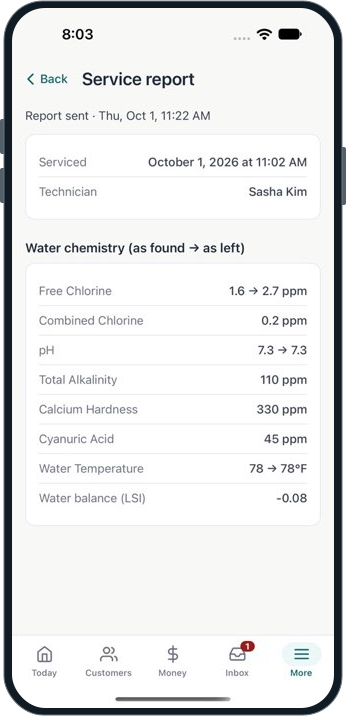
Read company details, customers, pools, invoices with line items, and visits with chemical readings through the PoolBoss API at /api/v1/. Lists arrive newest first, with cursor pagination of up to 100 records. PoolBoss supplies the records your developer needs so your office does not have to assemble the same export by hand each time.
Look up a customer by email, list their pools or invoices, and create a customer with a read-write key. Keep an external reference ID with the new record. Your developer can connect customer intake to PoolBoss and reduce repeated typing between systems. Your developer can filter visits and invoices by status. Each key allows 120 requests a minute.
Send an event to an HTTPS endpoint when a visit completes or an invoice is paid. Each message includes the visit with readings or the invoice with its lines. PoolBoss can trigger your integration from the recorded work, so follow-up does not depend on an employee checking for changes. An admin adds the HTTPS endpoint in Integrations and chooses which events it receives.
Every message is signed with a secret that’s shown to you once, so your receiver can check it came from PoolBoss and wasn’t replayed. If your endpoint is down, PoolBoss tries again on a schedule for about 24 hours. Each endpoint has a delivery log with the response your tool gave, and a Redeliver button to send any message again.
The API and webhooks come with every PoolBoss plan, the same as every other feature. Plans differ by pool capacity and admin allowance, as the pricing page shows. Some pool software keeps full API access for its top tier, which is one of the differences on the PoolBoss vs Skimmer comparison.
PoolBoss connects each pool’s readings, treatment and history to the visit report, helping your crew plan the care and your office explain it.
You pay by how many pools you manage. No per-seat fees, no per-pool meter, and no surprise line on the bill as you grow.
PoolBoss includes every feature on every plan. Choose the pool capacity you need. Free allows one admin; paid plans include unlimited admins.
PoolBoss runs on supported iPhone and Android devices. Sign in and load the route before a signal gap, then record the visit offline and sync when connected.
“Works well and support's been good when I needed it.”
Answers for the way you run your route.
Yes. PoolBoss has a versioned REST API at /api/v1/ and webhooks, on every plan including Free. An admin creates a company API key in Settings › Integrations, read-only or read-write, and your tool sends it as a bearer token. The API reads your company, customers, pools, visits with their chemical readings, and invoices with their line items, and a read-write key can create customers.
The API reads company details, customers, pools, visits with chemical readings including LSI, and invoices with line items. Lists use cursor pagination, newest first, with up to 100 records per page. A read-write key can also create customers with an external reference ID. Your developer can use PoolBoss records in your company’s reporting or intake process instead of asking the office to maintain a second set of data. Each key reads only your own company’s data.
Events are available for a completed visit and a paid invoice. Each endpoint can subscribe to the events it needs. Payloads include the visit with readings or invoice with lines in the same shape the API returns. PoolBoss gives your integration a timely signal to start the next task, such as updating your own reporting system, without repeatedly checking for new activity.
Verify the PoolBoss-Signature header using your endpoint secret. It contains a timestamp and an HMAC-SHA256 signature of the timestamp and body. Check the timestamp and event ID as part of replay handling. The secret is shown once when it is created. These checks let your developer confirm that an update came from PoolBoss before your other system acts on it. Reject timestamps older than five minutes and skip event IDs your receiver has already handled.
PoolBoss retries on a schedule over about 24 hours, with nine attempts beginning a minute later. The endpoint’s delivery log shows the response from your receiver. After correcting the issue, use Redeliver to send a message again. Your developer can recover a missed handoff without asking office staff to recreate the underlying visit or payment.
Yes. Any automation tool that can receive a webhook can start a workflow when a visit is completed or an invoice is paid, and any tool that can call a REST API with a bearer key can read your PoolBoss records or add a customer. Create a key or an endpoint in Settings › Integrations and paste it into the tool.
Yes. The API and webhooks are on every plan, Free included, like every other PoolBoss feature. Plans differ by pool capacity and admin allowance. Each API key can make 120 requests a minute.
Start with up to 20 pools free. Every plan includes every feature, with unlimited techs and office managers.
Start freeFree includes 1 admin. Paid plans start with a 30-day trial.