PoolBoss

PoolBoss for the office

Keep your office connected to every pool your crew services

PoolBoss gives your office the same pool and visit records your crew uses in the field. Plan coverage, answer customer questions and prepare invoices in the web app, with the work behind each decision in front of you.

Every feature included · Unlimited office managers

Sunlight across clear pool lanes and a warm stone deck
From the poolside visit to the office record
Coordinate the crewReview the service recordReview and send invoicesUnderstand your numbers

Keep the pools covered when the schedule changes

Build recurring routes with a technician, service day and stop order. PoolBoss creates the visits, then gives the assigned technician the pool details and service requirements.

For work that does not happen every visit, PoolBoss shows the maintenance due this month and when each item was last done. Your office can plan that work alongside the regular route instead of keeping a separate reminder list.

When someone is out, review the affected work and reassign the stops. Your office can change one day’s coverage without rebuilding the recurring schedule.

Explore scheduling

From the office plan to the completed record

  1. Office assigns the route

    Set the technician, recurring service day and the work required at each stop.

  2. Technician records the visit

    The assigned tech opens the pool details, enters readings and completes the service checklist.

  3. Office follows through

    Review the synced record, answer customer questions and keep the completed work connected to billing.

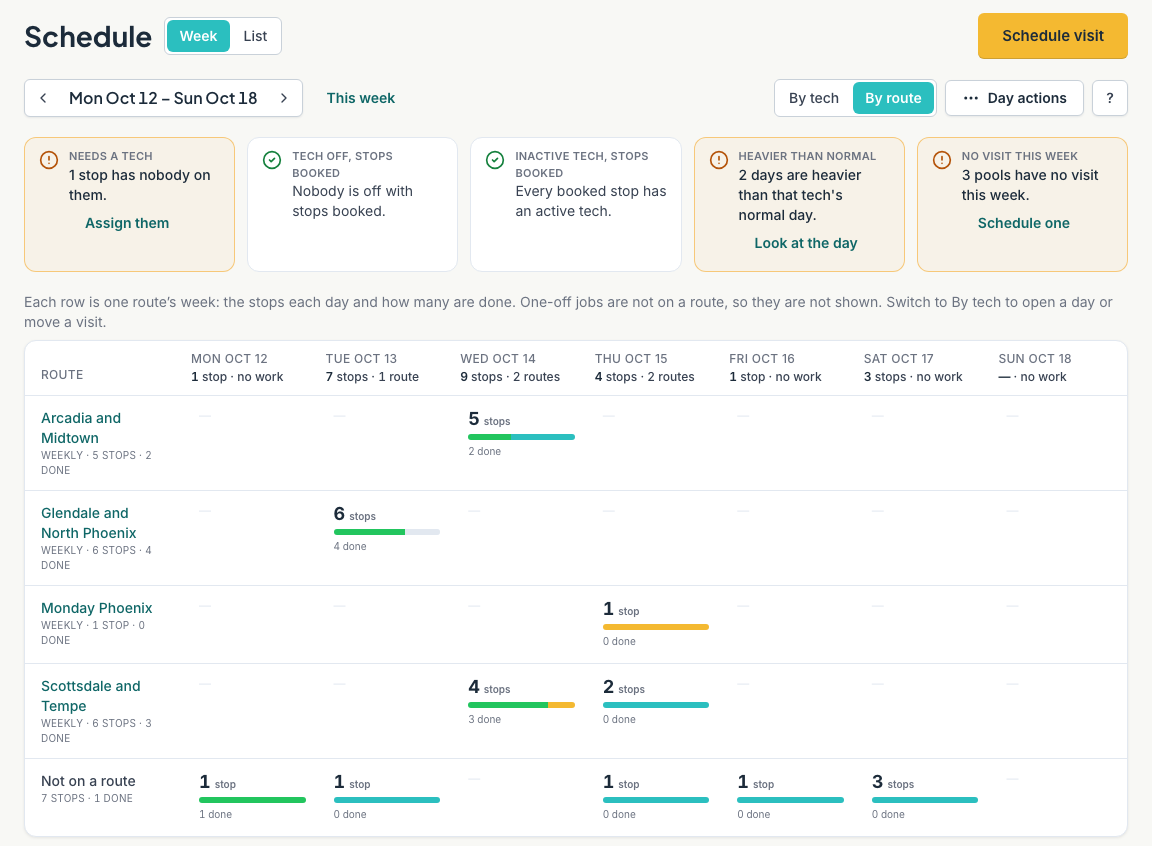
PoolBoss office · Weekly schedulingOpen full-size view ↗
PoolBoss weekly route schedule with booked stops, completion progress and coverage alerts
Weekly scheduling in the PoolBoss web app

The route on the map

See where the stops take your crew

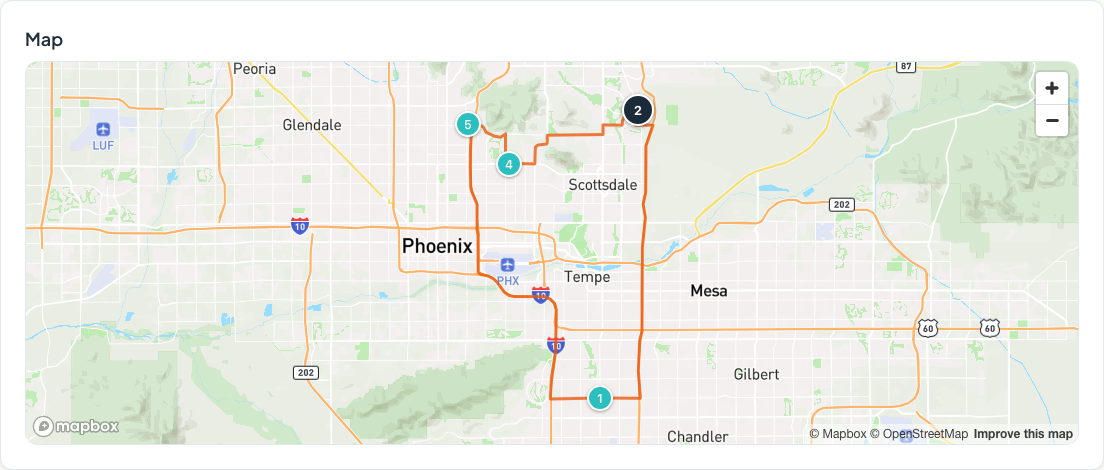
PoolBoss draws numbered stops and the driving path on the map, so your office can review the route’s geography before changing the stop order.

Plan your routes in PoolBoss
PoolBoss office · Route mapEnlarge map ↗
Actual PoolBoss office route map showing numbered pool stops around Phoenix and Scottsdale connected by the driving path
The route map in the PoolBoss office app

Answer a customer’s question with the visit in front of you

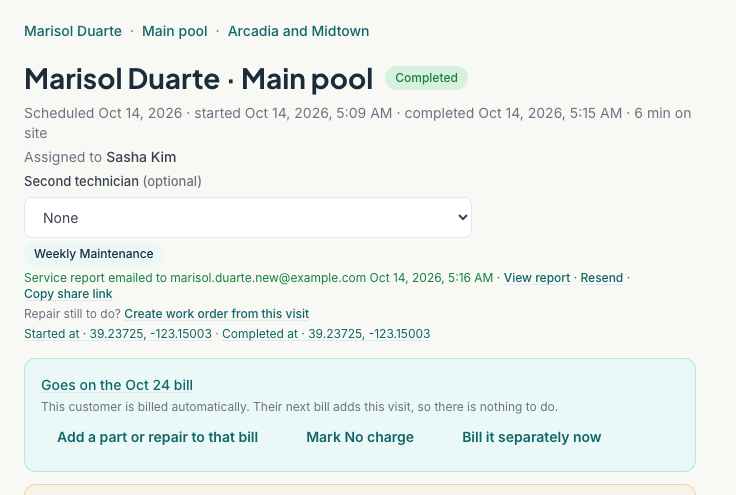
Open a completed visit in PoolBoss to see who serviced the pool, when the work happened, whether the report was emailed and how it will be billed. Your office can answer from the record without interrupting the crew.

Customers can also send requests through their portal. PoolBoss puts those requests in your company’s request list so your office can review them and follow up. See the customer portal

PoolBoss web appCompleted visit
PoolBoss web app showing a completed Blue Horizon demo visit, technician assignment, emailed service report and the next bill date
Completed visit in the web app
Open the full-size screen

Find the work that needs an office decision

PoolBoss brings uncovered visits, accepted work waiting for scheduling and qualifying water-reading follow-ups into the needs-attention list. Open the underlying record to arrange coverage, schedule the job or review the pool’s readings, so the office can act without inspecting every account.

Check the report and send it again

PoolBoss shows the service report’s delivery record and lets your office open or resend it. When a customer asks whether service happened, staff can answer with the record instead of calling the tech back.

Review how the visit will be billed

The visit shows its billing state. Review a scheduled charge, add a part or repair, or handle a separate invoice when that’s appropriate.

Try the office app free

Track invoices and payments across your accounts

PoolBoss connects each customer’s service records and invoices, so your office can prepare the bill from work the crew has already logged.

PoolBoss turns completed visits into invoice line items so your office can bill from recorded work. Review approved extras, tax and credits, then send the invoice and payment link under your company’s name.

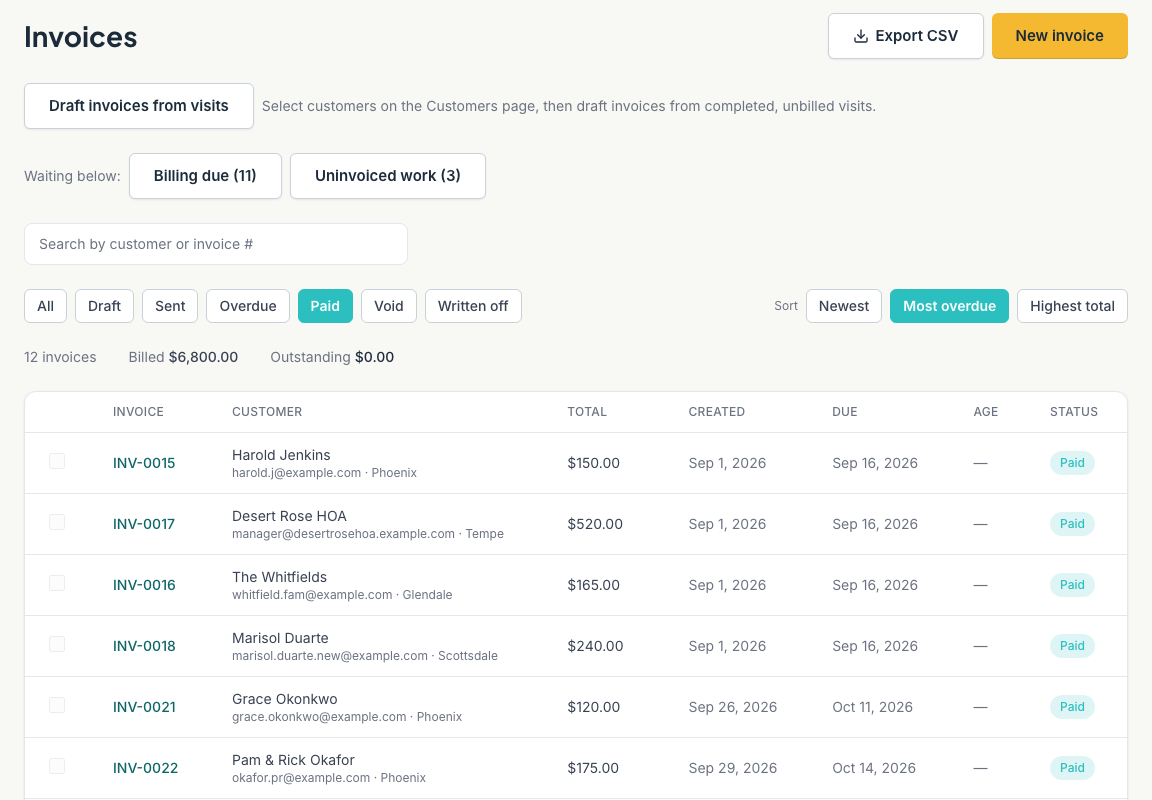
PoolBoss office · Invoice managementOpen full-size view ↗
PoolBoss invoice list filtered to paid invoices, with customer names, totals and status
Invoice management in the PoolBoss web app

Draft from recorded work

Use per-visit billing or a fixed monthly amount for an account. Review draft invoices before sending, or use your company’s automatic billing settings.

Send a clear customer invoice

Check the details and email the invoice. The customer can pay from the link without calling your office.

Follow the payment status

PoolBoss shows draft, sent, overdue and paid invoices together. For customers who authorize autopay, PoolBoss collects eligible new invoices automatically and records the payment with the account. Declined-payment notices, method-update links and eligible retries give your office a way to follow up on balances that remain. Explore autopay and payment recovery

Give owners a clear view of revenue, costs and crew performance

PoolBoss reports bring revenue, unpaid balances and recorded service costs into view, helping you identify accounts that need attention before your next pricing or staffing decision.

Review and approve technician pay periods before exporting them for payroll. For repairs, PoolBoss gives your office reusable quote templates and parts inventory across the shop and trucks, so the next job starts with the pricing and stock records already in reach. Explore quotes, parts and repairs

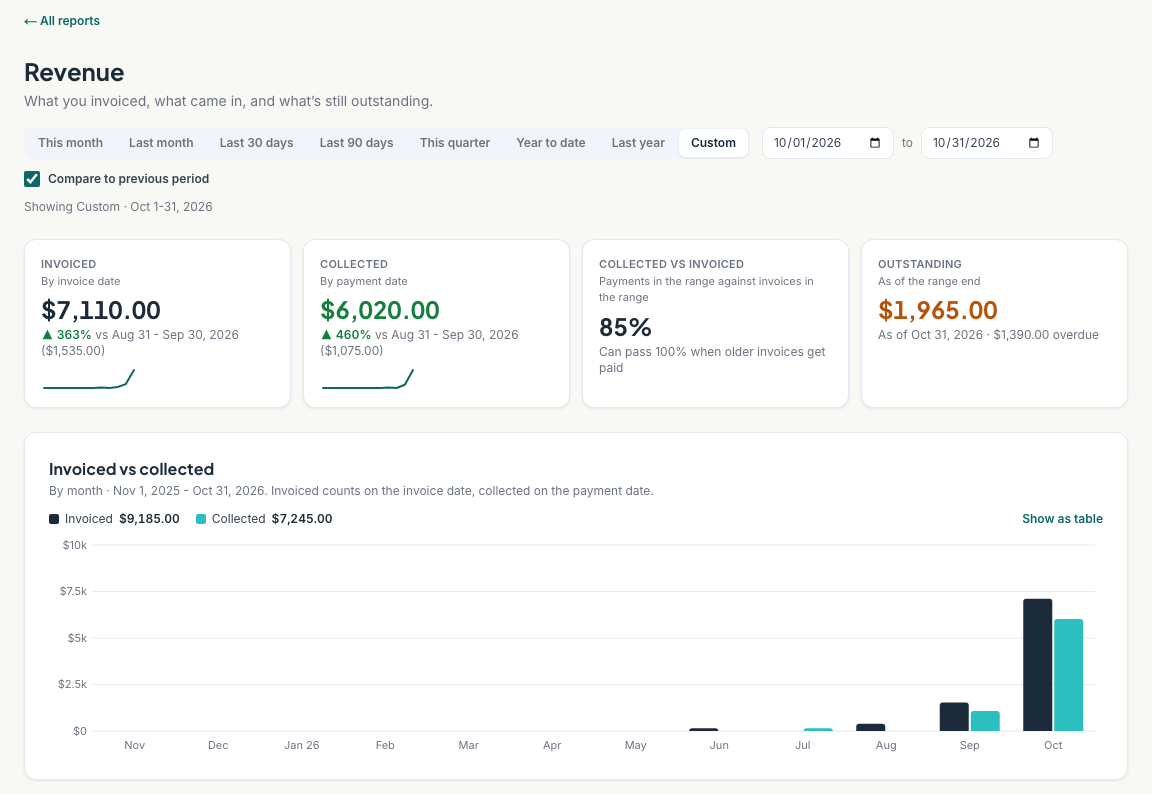
Compare invoiced revenue with collected payments, review outstanding balances, and look at profitability by customer, technician or route. Chemical costs use your unit costs and logged doses, with a recommended-dose estimate when no addition was logged. Technician pay uses the rates and work you’ve entered.

Choose a reporting period and follow the numbers back to the underlying records. Export CSV data when your accountant or payroll process needs it. PoolBoss gives your office a way to investigate the result and pass useful records to the people handling the books.

Explore business reporting
PoolBoss office · Revenue reportingOpen full-size view ↗
PoolBoss revenue report with invoiced and collected totals, outstanding balances and a monthly comparison chart
Revenue reporting in the PoolBoss web app

Add office staff without office-manager seat fees

Every plan includes all features, unlimited technicians and unlimited office managers. Free supports up to 20 pools and 1 admin. Paid plans include unlimited admins, with capacity based on pool count.

Bring your office into PoolBoss

Office web app questions

How the office, owner and field team work together.

Does PoolBoss have a web app for the office?

Yes. PoolBoss gives your back office a browser app for routes, schedules, customer records, service history, quotes and billing. Staff can arrange coverage, answer a customer’s question and follow an invoice from the same records your techs use. Admins also have financial reports, team management and company settings.

How does the web app connect with the technician app?

PoolBoss connects the office and field apps through the same customer, pool and visit records. Your office assigns the work; technicians record readings, tasks, notes and photos at the pool. Once synced, the office can review the completed work, answer the customer and prepare billing without asking the tech to enter it again.

How does PoolBoss show the office what needs attention today?

PoolBoss brings work needing an office decision into its Needs attention list, including uncovered visits, unscheduled jobs, customer requests and reading follow-ups. Each item leads to the record or action needed to handle it. Your team can work through the exceptions from one place instead of opening every customer and route to discover what went wrong or still needs arranging.

Can office staff manage more than one technician?

Yes. PoolBoss lets the office plan recurring routes across the crew and reassign a day or selected visits when coverage changes. Each technician sees their assigned work on the phone with the pool’s access details and history. Your team can cover an absence without rebuilding next week’s regular routes.

Can my office prepare repair quotes and parts while technicians are on the route?

Yes. In the PoolBoss web app, your office can turn a technician’s field concern into a quote, reuse saved quote lines and review the price before sending it. Once work is agreed, keep the job’s ordered and arrived parts together and check shop or truck stock. Office staff can prepare the next job while the crew continues the day’s service.

Can an office manager see financial reports?

Financial reports are available to admins. The office-manager role can handle scheduling, customers, quotes and invoices without access to company financial reports or team settings. Give a person the admin role when their responsibilities include those reports; paid plans include unlimited admins. PoolBoss lets you delegate daily office work while keeping company finances with the people responsible for them.

Do I pay for each person in the office?

No. Every PoolBoss plan includes unlimited office managers and technicians, so another dispatcher or billing person does not add a seat charge. Free includes 1 admin and up to 20 pools; paid plans include unlimited admins. Choose the plan for your pool capacity and give staff the role their work requires.

Can I use the office app before moving my whole company?

Yes. Start with up to 20 pools on PoolBoss Free, add your team and run a familiar route through scheduling, service, customer reports and billing. Every feature is available, so you can see how the office and crew work together before importing the rest of your company.


Run the office from the same records as your crew

Give the people planning, servicing and billing your pools a connected way to work.

Try the office app free

Start with up to 20 pools free. Every feature included.