Grow your field team without a per-technician charge
PoolBoss gives every tech the pool record, service checklist and billing context within one pool-capacity subscription. Adding help to the route does not add a technician seat charge.
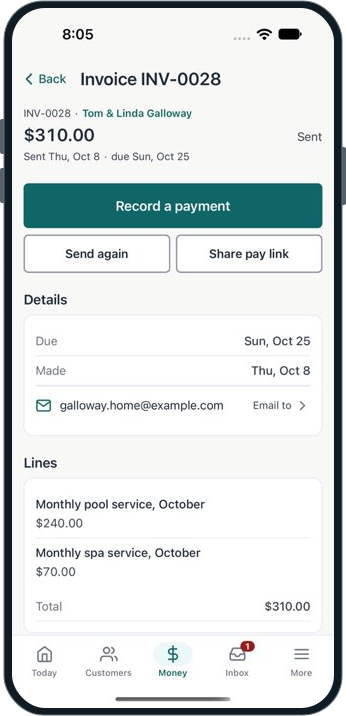
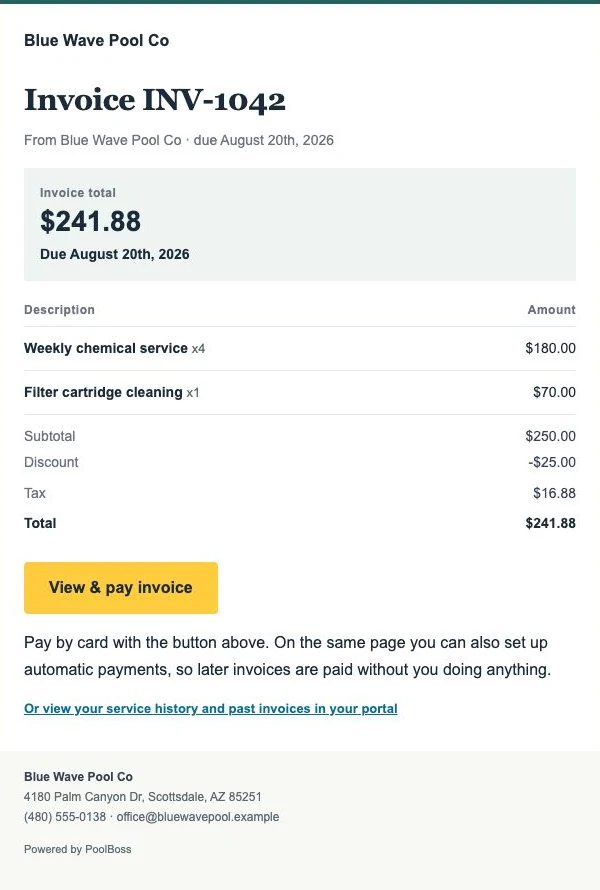
The customer should be able to understand what they are paying for. PoolBoss keeps the invoice with the account, while the pool history preserves the readings and completed work behind the service.
Review the chargesCheck invoice line items against the recorded work.
Send the payment linkGive the customer a direct way to pay the invoice.
Answer billing questionsReturn to the invoice and service history for the account.
Every feature included · Free for 20 pools and 1 admin
Add techs without another monthly charge
Paythepoolman lists a $50 monthly base plus $15 per tech. Three technicians cost $95 before optional products. PoolBoss Startup is $29/month standard for 100 pools with unlimited techs, saving $66 in this subscription example.
Give customers access without a separate customer-app purchase
Paythepoolman lists Pool Junction as an optional customer app. PoolBoss includes its browser portal on every plan, so customers can review service, find invoices and pay without your company buying another product.
PoolBoss includes readings, LSI, dose guidance, service reports and billing from Free. Your tech records the work once, and the office can explain charges and review chemical costs using that service history.
The published base is $50/month plus $15 per technician. Optional products and processing cost extra.
Check the billing term, included users and add-ons against your requirements. This is a subscription comparison. Payment fees and optional services may change the total.
Source reviewed November 11th, 2026. Published terms can change.
Run a route, send a report and review an invoice
Start with up to 20 familiar pools on Free. Import a few customer and pool records, complete a visit, then review its service report and the account’s invoice. Add the rest of your customer list when you’re ready.
Free for up to 20 pools and 1 admin. Every feature included.
Test with a pool your crew knows
Include access notes, a service checklist and the historical details your crew needs. Check imported records before using them on the route.
Review the service report and invoice
Have a tech record service, then open the same history from the office. Review the customer report and the invoice for that account.
Choose capacity for your pools and admins
Use the pricing calculator to choose the plan for your pool count and admin needs. Every plan includes unlimited techs and office managers, with customer-payment fees shown separately.
Both are pool-specific - pricing and offline are the split
Pay The Pool Man was built by a former pool contractor and covers the pool workflow well. The differences that matter for most operators are pricing and offline. Pay The Pool Man adds $10 a month per technician on top of a $50 base, so the bill grows with your crew, and there’s no free plan to start on.
PoolBoss charges a flat rate by pool count with unlimited users on paid plans, so adding techs or office staff never changes your price.
What Pay The Pool Man does well
Pay The Pool Man brings real field experience to the product: lead management for winning bids, integrated payroll, GPS tracking, and chemical readings through LaMotte meters and the Orenda calculator. For a solo operator who wants those built in and doesn’t mind the per-tech pricing, it’s a capable tool.
Where PoolBoss differs
PoolBoss works offline, so visits and readings complete without signal and sync when you reconnect - Pay The Pool Man needs a connection to work in the field, including to take payments. PoolBoss also starts free, puts every feature on every plan with no separate add-ons, and never charges per technician. See the mobile app.
What you’d pay as you grow
PoolBoss is flat by pool count and never charges per tech or per seat, so the bill flattens out. Here is the same growth on each tool, from a starter route to a large fleet.
Monthly cost as you grow: Pay The Pool Man vs PoolBoss, by techs, estimated from published prices as of November 12th, 2026.
Technicians
PoolBoss
Pay The Pool Man
1 tech
$29/mo
$65/mo
5 techs
$79/mo
$125/mo
10 techs
$249/mo
$200/mo
25 techs
$249/mo
$425/mo
50 techs
$249/mo
$800/mo
PoolBoss caps at $249/mo and never charges per tech. Pay The Pool Man is a $50 base plus $15 per technician, with no free plan. PoolBoss bills by pool count, not headcount, so its column assumes a typical route of about 50 pools per tech. Estimates use published list prices as of November 12th, 2026; your actual bill may differ.
See how PoolBoss connects the work
These are actual PoolBoss screens showing how route details, water readings, invoices and customer records fit together. Every feature shown is included on Free, which covers up to 20 pools and one admin.
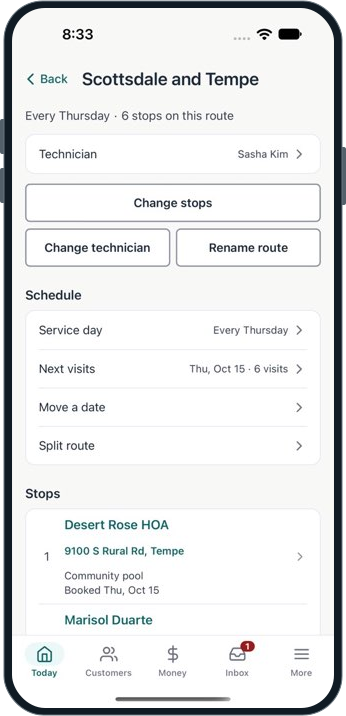
Send the route with the details your tech needs
PoolBoss keeps the assigned technician, recurring service day and ordered stops together. Your crew can see where to go without rebuilding the route every week.
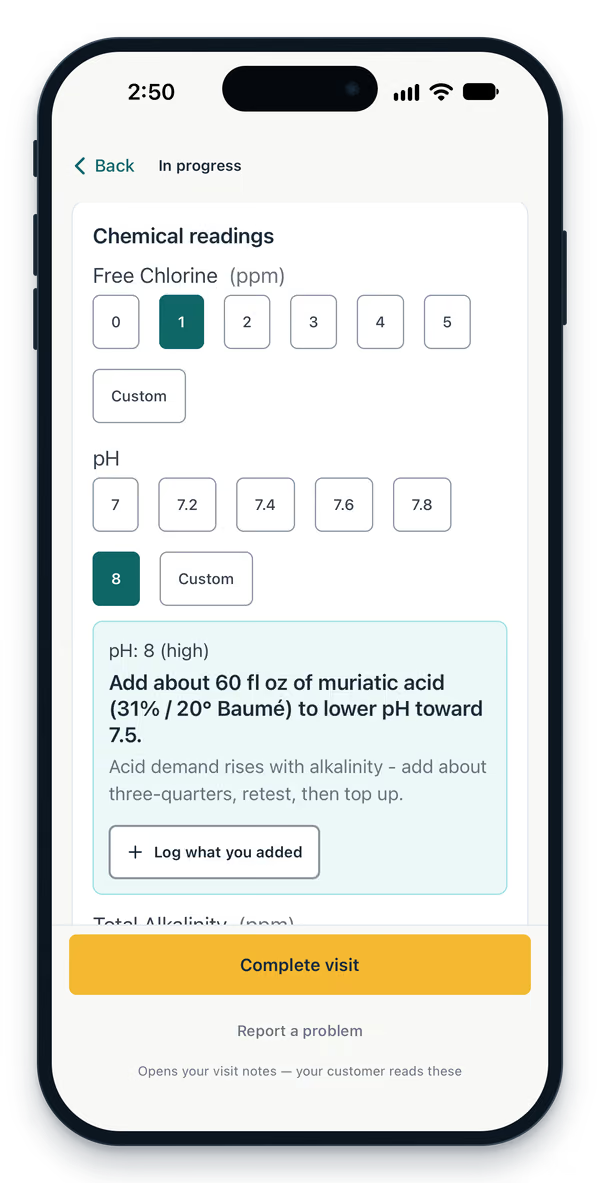
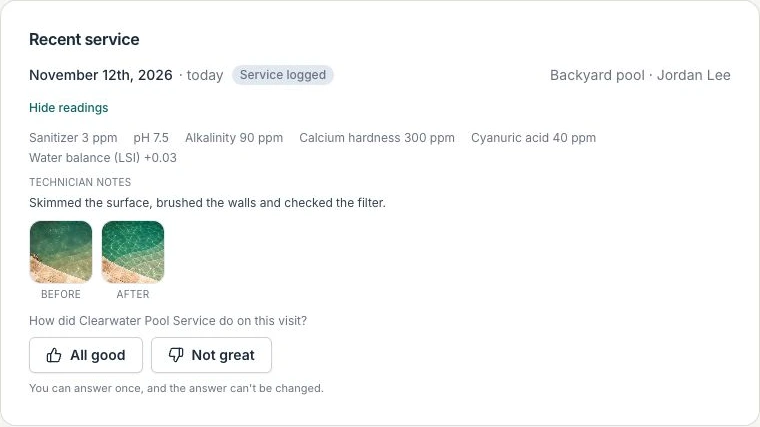
PoolBoss keeps readings with the visit and suggests a dose for the pool. Your office can use that service history when a customer calls or another technician covers the stop.
PoolBoss brings completed visits, water readings and feedback into your company’s customer portal. Customers can check the record without waiting for your office to answer a routine service question.
The customer’s service history, readings, photos and feedback
Import your customer list and set up your routes
You don’t have to pick a cutover day, and you don’t have to cancel anything to try it. Run both for a couple of weeks if you want — the free plan covers up to 20 pools and one admin with every feature and no time limit.
Export your customers and pools
Export your customer list out of Pay The Pool Man. Save it as CSV. You don’t have to clean it up, rename a single column, or match it to a template of ours.
Step one of four
Upload it and check the preview
We match your columns to ours automatically and show you exactly what we found - row by row, including anything we couldn’t read and any column we’re about to ignore. Nothing is written until you confirm.
Customers, then pools
Bring the history over too
Past visits and their chemical readings import the same way, so a customer who’s been on your route for three years still looks like it. Then build your routes and you’re running.
Same afternoon
What actually comes over?
Customers, pools and their specs, routes with stop order, and past visits with their chemical readings - chlorine, pH, alkalinity, hardness, CYA, salt and temperature.
Do I have to cancel Pay The Pool Man first?
No. Nothing here asks for a card, so you can run both until you’re satisfied and cancel on your own schedule.
What if the file is a mess?
Most of them are. The preview flags the rows it can’t read and the columns it isn’t using, so you fix them before anything is created - not after.
What if I import the same file twice?
Customers, pools and visit history are matched and skipped rather than duplicated, using your old system’s record IDs when the export includes them.
Will my customers get emailed?
No. Importing three years of history doesn’t send three years of service reports. Historical visits import silently.
What does it cost?
Nothing. The importer is part of the product on every plan, including free.
Compare costs for your company
Price
Pay The Pool Man is $50 a month plus $15 per technician, so it starts cheap and climbs with the crew. Ours is flat by pool count. At a small shop the gap is narrow - move both sliders, because which one wins genuinely depends on your ratio.
Features
The bigger difference isn’t price, it’s offline. Pay The Pool Man has no offline mode, so a tech behind a gate with no signal can’t log the stop. Ours saves the visit locally and syncs when the phone comes back.
Switching
Bring your customers, pools, routes and visit history across from a spreadsheet. Stay on the free plan up to 20 pools while you decide. No card, no clock, nothing to cancel if you walk away.
How PoolBoss compares to the rest of the field
Every head-to-head uses the same yardstick: what it costs at your pool count, what sits behind a higher tier, and what moving over actually takes.
It depends on your crew size. Pay The Pool Man starts at $50/mo plus $15 per technician, with no free plan. PoolBoss starts free up to 20 pools and charges a flat rate by pool count with unlimited users on paid plans, so it’s usually cheaper for teams and anyone starting small.
Does Pay The Pool Man have a free plan?
No. Pay The Pool Man offers a 30-day trial but no permanent free plan. PoolBoss has a free plan for up to 20 pools with every feature included.
Does Pay The Pool Man work offline?
No. Pay The Pool Man needs a connection to work in the field, including to take payments. PoolBoss completes visits and chemical readings offline and syncs when you reconnect.
Is Pay The Pool Man built for pool service?
Yes. It was built by a former pool contractor and tracks water chemistry through LaMotte meters and the Orenda calculator, like other pool-specific tools including PoolBoss.
Start a free account and try your service workflow
Start with up to 20 pools free. Every plan includes every feature, with unlimited techs and office managers.