Save the starting conditions
Add photos, notes and as-found readings before work begins. A visible equipment issue or extra debris then has a dated place in the pool’s history.

PoolBoss keeps each pool’s chlorine, stabilizer and water-balance history with its recurring route, so your Arizona crew can review the water and arrive with the right service details.
Free for up to 20 pools. Every feature included.
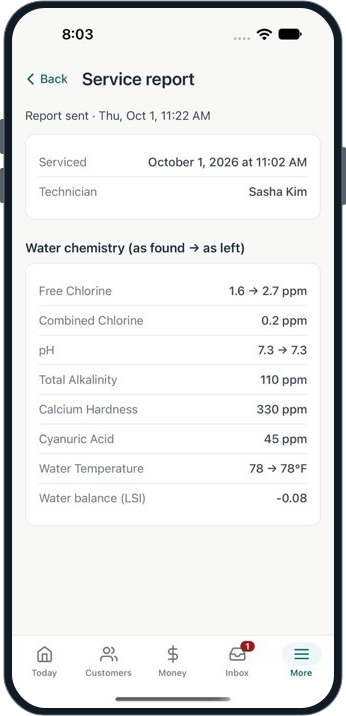
PoolBoss saves cyanuric acid (CYA), chlorine and other readings in each pool’s history, so your crew can compare visits and investigate what has changed.
This actual demo report shows recorded water before and after service, with the LSI retained in the technician record.
See water balance and dosingPoolBoss keeps a separate chemistry history for every pool, giving your crew a record to consult as summer demand and service conditions change.
Record free chlorine and CYA with the rest of the chemistry. Review the pool’s pattern instead of treating a single reading as the whole story.
PoolBoss calculates LSI from pH, temperature, calcium and alkalinity, with CYA and salt corrections. Saving the result with the visit helps your crew investigate recurring water-balance concerns instead of treating each test as an isolated number.
Log what the tech actually added. Chemical cost by pool helps the office investigate accounts whose supply needs warrant a closer look.
Open its previous readings, sanitizer, volume and equipment notes before deciding on the visit’s work.
Log the current water readings, dose and notes, including any unusual dust or debris conditions.
The record stays with that pool, and your report lets the customer see the care your technician logged.
Every feature on every plan. Free includes up to 20 pools and 1 admin.
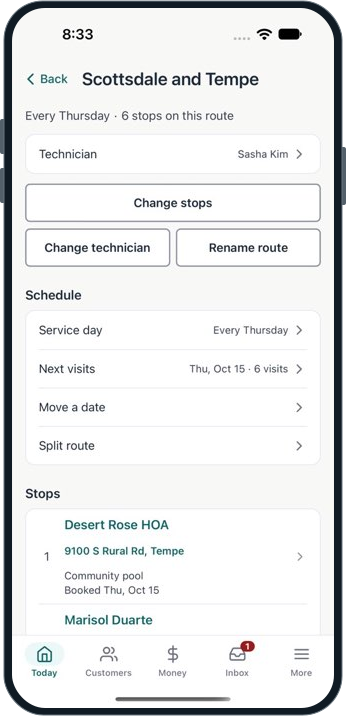
PoolBoss lets you place new accounts in recurring routes and preview an optimized stop order, so your office can review both the service day and the drive across the Phoenix metro.
A customer arrival window, gate code or equipment location stays with the stop. When another tech covers a day, they receive the pool context along with the work.
Create separate recurring routes for the areas your crew serves. Each tech sees their own visits while the office manages the broader week. Explore route management
Add photos, notes and as-found readings before work begins. A visible equipment issue or extra debris then has a dated place in the pool’s history.
Log readings, completed tasks, chemical additions and equipment checks. Before-and-after readings preserve the recorded change during service.
Send the service report and keep additional work clear on the invoice. The office can refer to the visit when explaining the charge.
Explore service reports See billingPoolBoss is pool service software for pool companies in Arizona. It’s built for desert conditions that burn off chlorine fast and push stabilizer high: log readings at each pool on your phone, keep a clear history visit to visit, and bill from the work you logged. The Free plan covers up to 20 pools at no cost.
Arizona has some of the highest residential pool density in the country - the Phoenix metro alone has more than 300,000 residential pools. Most routes run year-round because pool season never fully ends in a desert climate, though the chemistry demands shift dramatically between the brutal May-to-September stretch and the milder winter months.
For an Arizona pool company, that means a route that runs 52 weeks a year, chemistry that moves fast in the summer and more slowly in the winter, and a spread-out metro where route efficiency makes a real difference in how many accounts you can serve in a day.
The biggest challenge in Arizona is what the desert sun does to chlorine and cyanuric acid. Intense UV burns off free chlorine fast in the summer months. CYA climbs over the season as you add stabilized chlorine. When CYA gets too high, chlorine stops working effectively - and in a Phoenix summer, that’s when algae wins.
PoolBoss logs the full reading set at each visit: free chlorine, combined chlorine, pH, total alkalinity, calcium hardness, and cyanuric acid. Each reading saves to that pool’s history, so you can watch CYA build on specific accounts over the season and catch the ones trending toward the point where chlorination stops being effective. The chemical record is per-pool, not averaged across your route.
Arizona’s monsoon season adds a different challenge: heavy dust loads, debris, and rain events that dilute chemistry and drop pH. After a dust storm, pools that were in range need re-treatment. After a significant rain event, the readings shift.
PoolBoss gives each post-monsoon visit its own readings and notes, so your office can explain what changed at that pool. When a customer asks why the pool required extra treatment after the storm system in August, the visit record has the before and after readings, the notes you added, and the date. That gives the customer a clear record of why your crew performed the extra work.
Phoenix metro sprawl means stops can be far apart if the route isn’t organized. PoolBoss keeps your stops in the order you set them - you optimize the drive once, and that’s the order the route runs until you change it. If you have three techs on three different parts of the metro, each one sees only their own route in the mobile app.
When coverage changes - a tech is out, you add a new cluster of accounts on the west side - you adjust in the dashboard and the change shows up in the tech’s app immediately. No paper sheet, no text chain to communicate the update.
Arizona field techs work in conditions that make anything fiddly impractical. The PoolBoss mobile app is designed to be fast in the field: today’s ordered stops, pool specs and last readings visible before you start, a chemical form that captures the full reading in one pass, and a mark-complete that puts the visit in the record.
When a tech finishes the route, the admin can see every completed visit and reading from the web dashboard without calling anyone. If a pool was flagged with a note, it’s visible. If a stop was skipped, that’s visible too.
PoolBoss connects your service records to billing so you can create invoices from the visits your techs logged and send them with an online payment link. Customers can pay by card from their inbox, while your office works from the recorded service as it prepares the bill.
For Arizona companies running a year-round route, consistent invoicing matters. Slow billing means slow payment; PoolBoss gives customers a direct way to pay from the invoice, which can help your office collect sooner.
The PoolBoss Free plan covers up to 20 pools at no cost, no trial expiration, and every feature included: routes, chemical tracking, invoicing, and the mobile app. When you pass 20, you move to Startup at $29. The pricing is the same for an Arizona operator as it is anywhere else in the country.
Free
Up to 20 pools at no cost. Move up by pool count as your Arizona route grows.
Every plan includes every feature. Choose your pool capacity; Free has one admin and paid plans include unlimited admins.
See all plans and pricing21 workflows across PoolBoss and 12 alternatives. A request to confirm a feature is not a claim that it is absent.
Scroll across to compare providers. Column headings stay visible as you read.
| Workflow | PoolBoss | Skimmer | Pool Brain | Jobber | Housecall Pro | GorillaDesk | Pool Founder | PoolDial | Paythepoolman | Pool Service Software | Pool Office Manager | POOL360 PoolService | ServiceTitan |
|---|---|---|---|---|---|---|---|---|---|---|---|---|---|
| Recurring routes and schedules | Included · generate repeat visits without rebuilding the week | Route builder | Jobs and route stops | Recurring visits | Scheduling and dispatch | Scheduling | Route builder | Routes and schedules | Recurring routes | Routes and scheduling | Daily and weekly scheduling | Scheduling | Scheduling and dispatch |
| Route optimization | Included · preview stop order and arrival-window conflicts | Scaling Up | One-click optimization | Listed; confirm selected plan | Max plan | Pro plan | Route building and Best Fit | Route optimization | Optimization; confirm stop limits | Routing tools; confirm optimization | Route optimization | Route optimization | Confirm in your chosen plan |
| Water readings and pool history | Included · review the test history for the correct pool | Chemical tracking | Per-body-of-water records | Readings through mobile checklists | Chemical data and service history | Material-use tracking; confirm water-reading fields | Pool chemistry and history | Chemical tracking | Pool measurements and readings | Readings and chemistry history | Chemical tracking | Water analysis | Confirm in your chosen plan |
| LSI and dose guidance | Included · calculate from the visit readings and pool volume | Scaling Up | Dose calculations; configurable methods | Confirm LSI and dose calculation | Confirm LSI and dose calculation | Confirm LSI and dose calculation | LSI and dose guidance | Dose recommendations; confirm LSI | Orenda integration in Plus | LSI and dosage tools | Adjustment calculations; confirm LSI | Chemical prescriptions; confirm LSI | Confirm in your chosen plan |
| Service checklists and photo requirements | Included · give the crew a consistent service standard | Required checklist items on Scaling Up | Guided workflows | Job checklists on Connect | Checklist automations on Essentials | Notes and forms; confirm required-photo controls | Service tasks and photos; confirm completion rules | Custom inspections and photo proof | Checklists and photos; confirm completion rules | Photo proof; confirm completion rules | Custom reports and photos; confirm completion rules | Completion photos; confirm required controls | Forms and checklists; confirm requirements |
| Customer service reports | Included · show customers the care behind the bill | Reports and emails | Completion emails | Job documentation; confirm pool report format | Photo reports on Essentials | Confirm pool-specific report format | Visit reports | Service logs; confirm report detail | Emailed service records | Visit reports | Digital post-service reports | Emailed service reports | Confirm pool-specific report format |
| Offline field recording | Included · record visits, readings and photos through signal gaps | Offline field app; check sync requirements | Offline field app | Confirm offline recording scope | Offline viewing; confirm recording | Confirm offline recording scope | Offline technician app | Offline mobile mode | Confirm offline recording scope | Confirm offline recording scope | Confirm offline recording scope | Confirm offline recording scope | Confirm offline recording scope |
| Equipment and warranty records | Included · identify equipment before quoting or sending a tech back | Confirm in your chosen plan | Equipment by body of water | Confirm in your chosen plan | Confirm in your chosen plan | Device tracking; confirm warranty fields | Confirm warranty fields | Equipment records; confirm warranty fields | Confirm in your chosen plan | Confirm in your chosen plan | Equipment and inventory; confirm warranty fields | Confirm in your chosen plan | Confirm in your chosen plan |
| Periodic maintenance and due work | Included · plan work that is not due at every visit | Work orders and reminders | Filter and salt-cell clean scheduling | Recurring jobs; confirm due-work view | Recurring service plans on Max | Confirm due-work view | Recurring work; confirm due-work view | Work orders; confirm due-work view | Confirm in your chosen plan | Confirm in your chosen plan | Seasonal and repair scheduling | Confirm in your chosen plan | Confirm in your chosen plan |
| Quotes and repair jobs | Included · move field findings into proposed, scheduled and billable work | Quotes and jobs on Scaling Up | Quotes and jobs | Quotes and one-off jobs | Estimates; proposals vary by plan | Estimates | Quotes and work orders | Quotes and work orders | Bids and proposals | Confirm in your chosen plan | Quotes and repairs | Repair quotes | Estimates and pricebook |
| Chemical and parts inventory | Included · track shop/truck supplies and prepare repair parts | Shopping list; confirm stock controls | Chemical use and cost; confirm stock controls | Confirm stock and location controls | Confirm stock and location controls | Material tracking; confirm stock controls | Confirm in your chosen plan | Confirm in your chosen plan | Confirm in your chosen plan | Confirm in your chosen plan | Inventory control | Inventory and supplier ordering | Confirm package and stock controls |
| Owner and office work on mobile | Included · schedule visits and create quotes and invoices by role | Mobile tools; confirm required admin actions | Field and web quotes; confirm admin scope | Mobile app; confirm role scope | Mobile app; confirm role scope | Mobile app; confirm role scope | Mobile team app; confirm role scope | Mobile business tools | Mobile tools; confirm role scope | Mobile app; confirm role scope | Technician tools; confirm office scope | Mobile service app; confirm office scope | Field app; confirm office scope |
| Recurring invoices | Included · bill from completed visits or a fixed monthly rate | Invoicing | Automatic/manual, per-visit/flat-rate | Recurring jobs and invoices | Invoicing; recurring plans vary by tier | Subscription billing on Pro | Invoices from completed work | Invoicing | Batch billing | Invoicing | Automated repeating invoices | Automated billing | Invoicing; confirm recurring setup |
| Customer-authorized autopay | Included · collect eligible new invoices within a day of sending | Autopay | Payments; confirm automatic-collection setup | Automated collection on Connect | Payments; confirm automatic-collection setup | Subscription billing on Pro | Autopay | Autopay | Autopay | Confirm autopay workflow | Confirm automatic-collection setup | Confirm automatic-collection setup | Confirm package and collection setup |
| Card and bank payment choices | Card checkout and eligible US-bank autopay · payment fees separate | Confirm supported methods and fees | Confirm processor methods and fees | Online payments; confirm methods and fees | Online payments; confirm methods and fees | Payment integrations; confirm methods and fees | Card and ACH | Confirm methods and fees | Card payments; confirm ACH and fees | Payments; confirm methods and fees | Stripe integration; confirm methods and fees | Online payments; confirm methods and fees | Confirm processor methods and fees |
| Customer portal | Included · customers can find reports, invoices and payment options | Customer portal | Portal and service history | Client Hub | Confirm selected customer-portal scope | Pro plan | Customer web portal | Customer portal | Optional Pool Junction customer app | Separate module; first 10 active clients free | Confirm customer-portal scope | Confirm customer-portal scope | Confirm customer-portal scope |
| QuickBooks Online | Included · send supported invoices and payments without re-entry | Listed integration | QuickBooks sync; confirm edition | Connect plan | Essentials plan | Pro plan | QuickBooks sync | Listed; confirm edition | Confirm supported integration | Listed; confirm setup and module terms | $25/month add-on | QuickBooks integration; confirm edition | Confirm edition and package |
| API and webhooks | Included · connect supported records to your own tools | Custom integrations on Enterprise; confirm API scope | Confirm API access and price | App marketplace; confirm API scope | Open API on Max | Zapier on Pro; confirm API scope | Confirm in your chosen plan | Developer API | Confirm in your chosen plan | API module: $99/month + $295 activation | Confirm in your chosen plan | Confirm in your chosen plan | Confirm package and API scope |
| Ongoing free plan | 20 pools and 1 admin · every feature, no trial deadline | Paid plans after trial | Paid plans after trial | Paid plans after trial | Paid plans after trial | Paid plans after trial | Paid plans after trial | Paid plans after trial | Paid plans after trial | 10 properties; modules have separate terms | Paid plans after trial | Request current terms | Request current terms |
| What makes the subscription grow | Pool capacity · no technician, route or office-manager seat fees | Serviced locations and plan | Active field technicians | Plan and user allowance | Plan and user allowance | Plan and route count | Technician count and enrollment rate | Serviced pools | Base plus technician count | Property plan and optional modules | Active users and optional modules | Request current quote | Quoted package and technician count |
| All features in the entry plan | Yes · adopt more PoolBoss tools without a feature upgrade | No; Scaling Up and Enterprise add tools | All features advertised; confirm services | No; feature tiers | No; feature tiers | No; feature tiers | All features advertised; optional phone answering | Platform included; confirm services | Optional products and packages | Portal and API modules separate | Core features; optional modules | Confirm current package | Packages differ |
PoolBoss connects each pool’s readings, treatment and history to the visit report, helping your crew plan the care and your office explain it.
You pay by how many pools you manage. No per-seat fees, no per-pool meter, and no surprise line on the bill as you grow.
PoolBoss includes every feature on every plan. Choose the pool capacity you need. Free allows one admin; paid plans include unlimited admins.
PoolBoss runs on supported iPhone and Android devices. Sign in and load the route before a signal gap, then record the visit offline and sync when connected.
“I recommend it to anyone running routes who's tired of doing it by hand.”
Free covers up to 20 pools and 1 admin, with every feature included and no trial clock. Every plan includes unlimited techs and office managers. Paid plans add capacity, unlimited admins and a 30-day trial.
Free for up to 20 pools. Every feature included.
Answers for the way you run your route.
Yes. PoolBoss works for pool companies throughout Arizona and across the United States. It connects recurring routes, pool details, chemistry, customer reports and billing, so your crew and office use the same service record. Set the service schedule for your accounts; you do not need a state-specific version of PoolBoss.
Yes. PoolBoss keeps chlorine, pH, alkalinity, calcium hardness, CYA, salt and temperature readings with each pool. Range flags, LSI and dose guidance help your tech assess the test, while visit history shows whether a problem keeps returning. Your office can review that same history when planning follow-up work or discussing service with the customer.
A flat rate by pool count, the same everywhere: Free up to 20 pools, $29 a month up to 100, $79 up to 250, and $249 for more than 250. Every plan includes every feature.
Record CYA and chlorine in the PoolBoss visit, then compare the results with that pool’s earlier tests. Each body of water keeps its own history, including a customer’s separate spa. Your crew and office can investigate a recurring pattern using the actual record instead of trying to remember what happened at the last stop.
Use PoolBoss to group nearby accounts into recurring routes and review the stops on a map. Preview an optimized order with any site arrival windows, then assign the route to a technician. The office can arrange coverage across the metro while each tech receives their own ordered stops and access details.
PoolBoss has a mobile app for technicians: today’s ordered stops, each pool’s specs and history, a chemical-logging form at the stop, and a mark-complete when done. Owners and office managers can also schedule visits and create quotes and invoices on the phone according to their role. The web dashboard gives the office a larger view of synced visits and readings.
Yes. The PoolBoss Free plan covers up to 20 pools at no cost, includes every feature, and has no trial period. You move up by pool count as your route grows, not by a timer.
Start with up to 20 pools free. Every plan includes every feature, with unlimited techs and office managers.
Start freeFree includes 1 admin. Paid plans start with a 30-day trial.