Group the accounts that fit together
Arrange stops geographically and include customer arrival windows. New accounts can be placed within the existing route instead of forcing a rebuild of the whole day.

PoolBoss connects recurring routes, technician assignments and customer records, so your Texas office can coordinate the drive and manage residential and commercial work together.
Free for up to 20 pools. Every feature included.
PoolBoss keeps each pool’s service details separate under the right customer, so your office can manage neighborhood routes and multi-pool properties in the same system.
Keep nearby pools in a useful stop order, with access notes and the previous visit available to the tech. Recurring service creates the next run of work.
See route managementKeep each body of water’s specs, readings and equipment history separate under the customer. Give the property manager a service record for the correct pool.
Explore commercial and HOA serviceBuild the recurring route and assign it to the technician covering that area.
Residential and commercial pools keep their specs, readings and visit history under the right customer.
The office reviews the visits and charges, then sends a clear invoice with a payment link.
Every feature on every plan. Free includes up to 20 pools and 1 admin.
Arrange stops geographically and include customer arrival windows. New accounts can be placed within the existing route instead of forcing a rebuild of the whole day.
Assign named recurring routes to the technicians who run them. Each tech sees their own daily stops, while the office reviews routes and the week’s work.
When someone is away, move a day or batch of visits to another tech. Keep the recurring route’s regular owner intact and use the map’s visit-based progress to follow the day.
Explore scheduling See team roles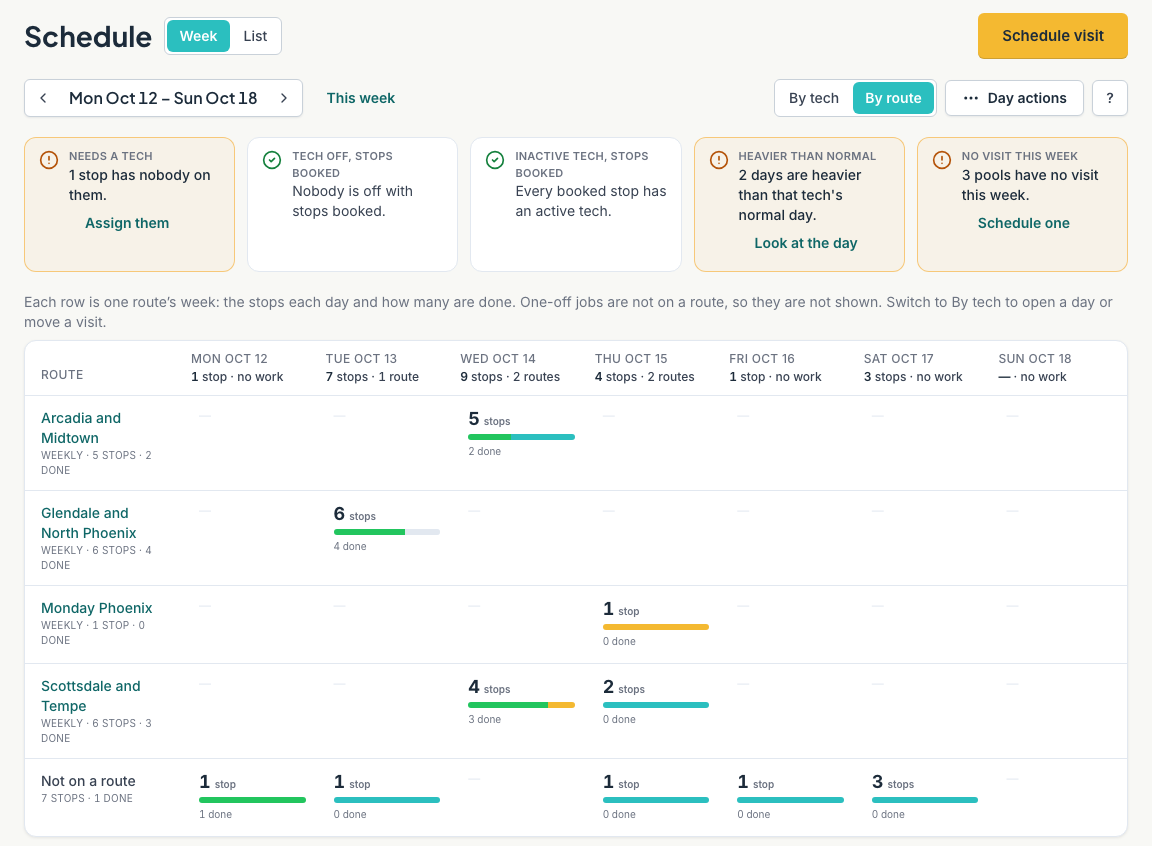
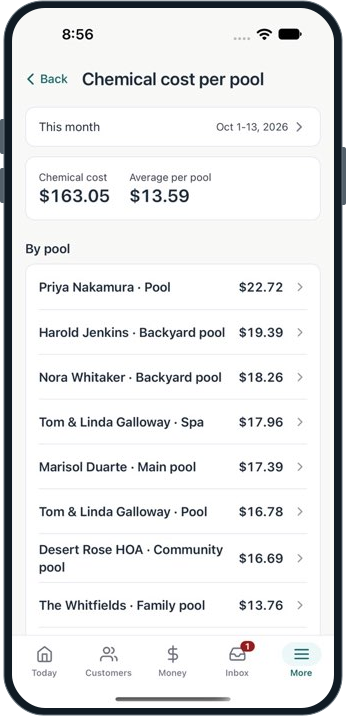
PoolBoss records water readings and chemical use by pool, so your office can investigate a costly account using its own service history rather than a route average.
Before-and-after readings, notes and confirmed chemical additions preserve the visit’s details. Range flags help the tech and office find values that need attention.
Compare chemical cost per pool when reviewing the account’s service price and requirements. The report shown here attributes recorded chemical cost to individual pools. Explore chemistry and history
The PoolBoss mobile app brings route details, pool specs, reading entry and service tasks together, with offline records syncing when the connection returns so the office can review the work.
Service reports show logged readings, photos and completed work. The portal gives customers a place to revisit their account.
PoolBoss turns recurring service and approved extras into itemized invoices with payment links. Your office can see what is paid and offer autopay, keeping a growing route’s revenue from becoming a growing list of bills to chase.
PoolBoss is pool service software for pool companies in Texas. It’s built for long routes and hot-summer chemistry across residential and commercial accounts: order your stops, log readings at each pool on your phone, and bill from the visits you logged. The Free plan covers up to 20 pools at no cost.
Texas is one of the largest pool service markets in the country. The Houston, Dallas, Austin, and San Antonio metros each have dense residential pool populations, and the combination of long hot summers and mild winters means most Texas routes run close to year-round.
For Texas pool companies, the challenge is scale and geography: routes that cover serious ground, a long summer heat stretch that puts demands on pool chemistry, and the mix of residential and commercial accounts that comes with big metros. A Dallas-area company might have 200 stops spread across 30 miles of suburbs.
Texas routes cover distance. PoolBoss keeps your stops in the order you set and builds that order into each technician’s day in the mobile app. You optimize the drive once - organizing stops geographically - and the route runs that way until you change it.
When you add accounts or adjust territory, you place the new stop in the right position in the route. When a tech picks up a new cluster of stops in a different part of the metro, you build a route and assign it to them, and it shows up on their phone.
Texas summers run hard from May through September. Heat and UV burn off free chlorine quickly. Evaporation concentrates pool chemistry over the summer. Cyanuric acid builds up with stabilized chlorine use. Algae pressure is high during the hottest months.
PoolBoss logs the full chemical reading at each visit: free chlorine, combined chlorine, pH, total alkalinity, calcium hardness, cyanuric acid, and temperature. The history is per-pool. By mid-summer you can see which accounts are trending and act before the chemistry gets away from you.
PoolBoss gives a Texas company with several crews a shared view of its routes and recorded visits. Each route is assigned to its technician and each tech works from their own stop list in the mobile app. The admin dashboard shows routes and completed visits as field records sync.
When coverage changes, your office can update assignments in PoolBoss. The technician receives the updated work when the app connects, keeping the route and pool details together instead of relying on a separate message for every stop.
Texas pool companies often run a mix of residential routes and commercial accounts - a neighborhood route plus an HOA, hotel, or fitness club. Each customer record holds as many pools as the property has, each with its own specs and chemical history. A residential customer with one pool and a commercial property with four sit in the same account.
After each commercial visit, PoolBoss generates a service report showing readings logged and work done. Property managers expect that documentation, and having it automatically is the difference between a service that looks professional and one that doesn’t.
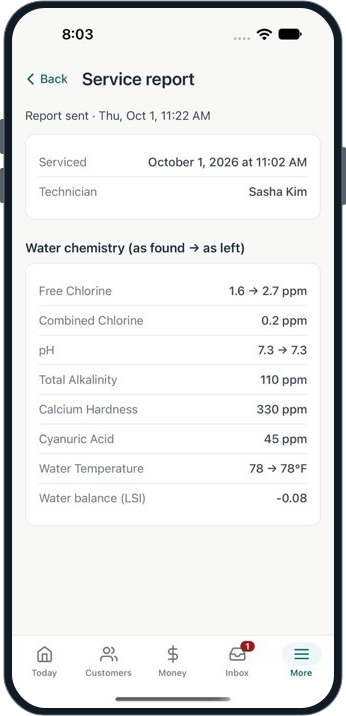
Texas techs cover ground across a full day of stops in summer heat. The PoolBoss mobile app keeps everything they need in one place: today’s route with ordered stops and addresses, each pool’s specs and previous readings before starting the chemical work, and a logging form that captures the full reading in one pass.
When the stop is done, the tech marks it complete and moves on. The admin sees the completed visit from the web dashboard. A note about an equipment issue at a stop is visible without a phone call.
The PoolBoss Free plan covers up to 20 pools at no cost, with every feature included - routes, chemical tracking, invoicing, and the mobile app. Above 20 pools, Startup is $29 a month. Above 100 pools, Pro is $79 a month. The pricing is the same for a Texas operator as anywhere else.
PoolBoss turns recurring service and approved extras into itemized invoices with payment links. Your office can see what is paid and offer autopay, keeping a growing route’s revenue from becoming a growing list of bills to chase. See PoolBoss billing and payments.
Free
Up to 20 pools at no cost. Move up by pool count as your Texas route grows.
Every plan includes every feature. Choose your pool capacity; Free has one admin and paid plans include unlimited admins.
See all plans and pricing21 workflows across PoolBoss and 12 alternatives. A request to confirm a feature is not a claim that it is absent.
Scroll across to compare providers. Column headings stay visible as you read.
| Workflow | PoolBoss | Skimmer | Pool Brain | Jobber | Housecall Pro | GorillaDesk | Pool Founder | PoolDial | Paythepoolman | Pool Service Software | Pool Office Manager | POOL360 PoolService | ServiceTitan |
|---|---|---|---|---|---|---|---|---|---|---|---|---|---|
| Recurring routes and schedules | Included · generate repeat visits without rebuilding the week | Route builder | Jobs and route stops | Recurring visits | Scheduling and dispatch | Scheduling | Route builder | Routes and schedules | Recurring routes | Routes and scheduling | Daily and weekly scheduling | Scheduling | Scheduling and dispatch |
| Route optimization | Included · preview stop order and arrival-window conflicts | Scaling Up | One-click optimization | Listed; confirm selected plan | Max plan | Pro plan | Route building and Best Fit | Route optimization | Optimization; confirm stop limits | Routing tools; confirm optimization | Route optimization | Route optimization | Confirm in your chosen plan |
| Water readings and pool history | Included · review the test history for the correct pool | Chemical tracking | Per-body-of-water records | Readings through mobile checklists | Chemical data and service history | Material-use tracking; confirm water-reading fields | Pool chemistry and history | Chemical tracking | Pool measurements and readings | Readings and chemistry history | Chemical tracking | Water analysis | Confirm in your chosen plan |
| LSI and dose guidance | Included · calculate from the visit readings and pool volume | Scaling Up | Dose calculations; configurable methods | Confirm LSI and dose calculation | Confirm LSI and dose calculation | Confirm LSI and dose calculation | LSI and dose guidance | Dose recommendations; confirm LSI | Orenda integration in Plus | LSI and dosage tools | Adjustment calculations; confirm LSI | Chemical prescriptions; confirm LSI | Confirm in your chosen plan |
| Service checklists and photo requirements | Included · give the crew a consistent service standard | Required checklist items on Scaling Up | Guided workflows | Job checklists on Connect | Checklist automations on Essentials | Notes and forms; confirm required-photo controls | Service tasks and photos; confirm completion rules | Custom inspections and photo proof | Checklists and photos; confirm completion rules | Photo proof; confirm completion rules | Custom reports and photos; confirm completion rules | Completion photos; confirm required controls | Forms and checklists; confirm requirements |
| Customer service reports | Included · show customers the care behind the bill | Reports and emails | Completion emails | Job documentation; confirm pool report format | Photo reports on Essentials | Confirm pool-specific report format | Visit reports | Service logs; confirm report detail | Emailed service records | Visit reports | Digital post-service reports | Emailed service reports | Confirm pool-specific report format |
| Offline field recording | Included · record visits, readings and photos through signal gaps | Offline field app; check sync requirements | Offline field app | Confirm offline recording scope | Offline viewing; confirm recording | Confirm offline recording scope | Offline technician app | Offline mobile mode | Confirm offline recording scope | Confirm offline recording scope | Confirm offline recording scope | Confirm offline recording scope | Confirm offline recording scope |
| Equipment and warranty records | Included · identify equipment before quoting or sending a tech back | Confirm in your chosen plan | Equipment by body of water | Confirm in your chosen plan | Confirm in your chosen plan | Device tracking; confirm warranty fields | Confirm warranty fields | Equipment records; confirm warranty fields | Confirm in your chosen plan | Confirm in your chosen plan | Equipment and inventory; confirm warranty fields | Confirm in your chosen plan | Confirm in your chosen plan |
| Periodic maintenance and due work | Included · plan work that is not due at every visit | Work orders and reminders | Filter and salt-cell clean scheduling | Recurring jobs; confirm due-work view | Recurring service plans on Max | Confirm due-work view | Recurring work; confirm due-work view | Work orders; confirm due-work view | Confirm in your chosen plan | Confirm in your chosen plan | Seasonal and repair scheduling | Confirm in your chosen plan | Confirm in your chosen plan |
| Quotes and repair jobs | Included · move field findings into proposed, scheduled and billable work | Quotes and jobs on Scaling Up | Quotes and jobs | Quotes and one-off jobs | Estimates; proposals vary by plan | Estimates | Quotes and work orders | Quotes and work orders | Bids and proposals | Confirm in your chosen plan | Quotes and repairs | Repair quotes | Estimates and pricebook |
| Chemical and parts inventory | Included · track shop/truck supplies and prepare repair parts | Shopping list; confirm stock controls | Chemical use and cost; confirm stock controls | Confirm stock and location controls | Confirm stock and location controls | Material tracking; confirm stock controls | Confirm in your chosen plan | Confirm in your chosen plan | Confirm in your chosen plan | Confirm in your chosen plan | Inventory control | Inventory and supplier ordering | Confirm package and stock controls |
| Owner and office work on mobile | Included · schedule visits and create quotes and invoices by role | Mobile tools; confirm required admin actions | Field and web quotes; confirm admin scope | Mobile app; confirm role scope | Mobile app; confirm role scope | Mobile app; confirm role scope | Mobile team app; confirm role scope | Mobile business tools | Mobile tools; confirm role scope | Mobile app; confirm role scope | Technician tools; confirm office scope | Mobile service app; confirm office scope | Field app; confirm office scope |
| Recurring invoices | Included · bill from completed visits or a fixed monthly rate | Invoicing | Automatic/manual, per-visit/flat-rate | Recurring jobs and invoices | Invoicing; recurring plans vary by tier | Subscription billing on Pro | Invoices from completed work | Invoicing | Batch billing | Invoicing | Automated repeating invoices | Automated billing | Invoicing; confirm recurring setup |
| Customer-authorized autopay | Included · collect eligible new invoices within a day of sending | Autopay | Payments; confirm automatic-collection setup | Automated collection on Connect | Payments; confirm automatic-collection setup | Subscription billing on Pro | Autopay | Autopay | Autopay | Confirm autopay workflow | Confirm automatic-collection setup | Confirm automatic-collection setup | Confirm package and collection setup |
| Card and bank payment choices | Card checkout and eligible US-bank autopay · payment fees separate | Confirm supported methods and fees | Confirm processor methods and fees | Online payments; confirm methods and fees | Online payments; confirm methods and fees | Payment integrations; confirm methods and fees | Card and ACH | Confirm methods and fees | Card payments; confirm ACH and fees | Payments; confirm methods and fees | Stripe integration; confirm methods and fees | Online payments; confirm methods and fees | Confirm processor methods and fees |
| Customer portal | Included · customers can find reports, invoices and payment options | Customer portal | Portal and service history | Client Hub | Confirm selected customer-portal scope | Pro plan | Customer web portal | Customer portal | Optional Pool Junction customer app | Separate module; first 10 active clients free | Confirm customer-portal scope | Confirm customer-portal scope | Confirm customer-portal scope |
| QuickBooks Online | Included · send supported invoices and payments without re-entry | Listed integration | QuickBooks sync; confirm edition | Connect plan | Essentials plan | Pro plan | QuickBooks sync | Listed; confirm edition | Confirm supported integration | Listed; confirm setup and module terms | $25/month add-on | QuickBooks integration; confirm edition | Confirm edition and package |
| API and webhooks | Included · connect supported records to your own tools | Custom integrations on Enterprise; confirm API scope | Confirm API access and price | App marketplace; confirm API scope | Open API on Max | Zapier on Pro; confirm API scope | Confirm in your chosen plan | Developer API | Confirm in your chosen plan | API module: $99/month + $295 activation | Confirm in your chosen plan | Confirm in your chosen plan | Confirm package and API scope |
| Ongoing free plan | 20 pools and 1 admin · every feature, no trial deadline | Paid plans after trial | Paid plans after trial | Paid plans after trial | Paid plans after trial | Paid plans after trial | Paid plans after trial | Paid plans after trial | Paid plans after trial | 10 properties; modules have separate terms | Paid plans after trial | Request current terms | Request current terms |
| What makes the subscription grow | Pool capacity · no technician, route or office-manager seat fees | Serviced locations and plan | Active field technicians | Plan and user allowance | Plan and user allowance | Plan and route count | Technician count and enrollment rate | Serviced pools | Base plus technician count | Property plan and optional modules | Active users and optional modules | Request current quote | Quoted package and technician count |
| All features in the entry plan | Yes · adopt more PoolBoss tools without a feature upgrade | No; Scaling Up and Enterprise add tools | All features advertised; confirm services | No; feature tiers | No; feature tiers | No; feature tiers | All features advertised; optional phone answering | Platform included; confirm services | Optional products and packages | Portal and API modules separate | Core features; optional modules | Confirm current package | Packages differ |
PoolBoss connects each pool’s readings, treatment and history to the visit report, helping your crew plan the care and your office explain it.
You pay by how many pools you manage. No per-seat fees, no per-pool meter, and no surprise line on the bill as you grow.
PoolBoss includes every feature on every plan. Choose the pool capacity you need. Free allows one admin; paid plans include unlimited admins.
PoolBoss runs on supported iPhone and Android devices. Sign in and load the route before a signal gap, then record the visit offline and sync when connected.
“Does the job without a bunch of extra hassle.”
Free covers up to 20 pools and 1 admin, with every feature included and no trial clock. Every plan includes unlimited techs and office managers. Paid plans add capacity, unlimited admins and a 30-day trial.
Free for up to 20 pools. Every feature included.
Answers for the way you run your route.
Yes. PoolBoss works for pool companies throughout Texas and across the United States. It connects recurring routes, pool details, chemistry, customer reports and billing, so your crew and office use the same service record. Set the service schedule for your accounts; you do not need a state-specific version of PoolBoss.
Yes. PoolBoss handles residential and commercial accounts in the same company. Keep separate readings, equipment and service history for every pool, including multiple bodies of water under one customer. The office can coordinate routes and billing across that mix while techs see the requirements for each stop.
A flat rate by pool count, the same everywhere: Free up to 20 pools, $29 a month up to 100, $79 up to 250, and $249 for more than 250, with every feature on every plan.
PoolBoss connects recurring routes, structured water readings, service reports and billing for Texas pool companies. Your technicians record the work at the pool, and the office uses that history for customer questions, repair quotes and invoices. It gives residential and commercial work the same connected service process.
Build named recurring routes in PoolBoss, group accounts by geography and assign each route to its technician. Use the map and optimization preview to plan the drive, then follow recorded visit progress to see where the workload needs adjusting. Move a day or batch of stops when coverage changes without rebuilding the regular route.
PoolBoss gives your office a company schedule and dispatch map while each technician sees their assigned route on the phone. Review stop order, projected arrivals and recorded visit progress, then reassign affected work when someone is out. The pool’s access details and history travel with the assignment, helping a covering tech arrive prepared.
PoolBoss has a mobile app for technicians: today’s route with ordered stops, each pool’s specs and chemical history, a logging form at the stop, and a mark-complete. Owners and office managers also have phone tools for scheduling visits and creating quotes and invoices according to their role. The office can review synced visits and readings on the web dashboard without calling the tech.
Start with up to 20 pools free. Every plan includes every feature, with unlimited techs and office managers.
Start freeFree includes 1 admin. Paid plans start with a 30-day trial.